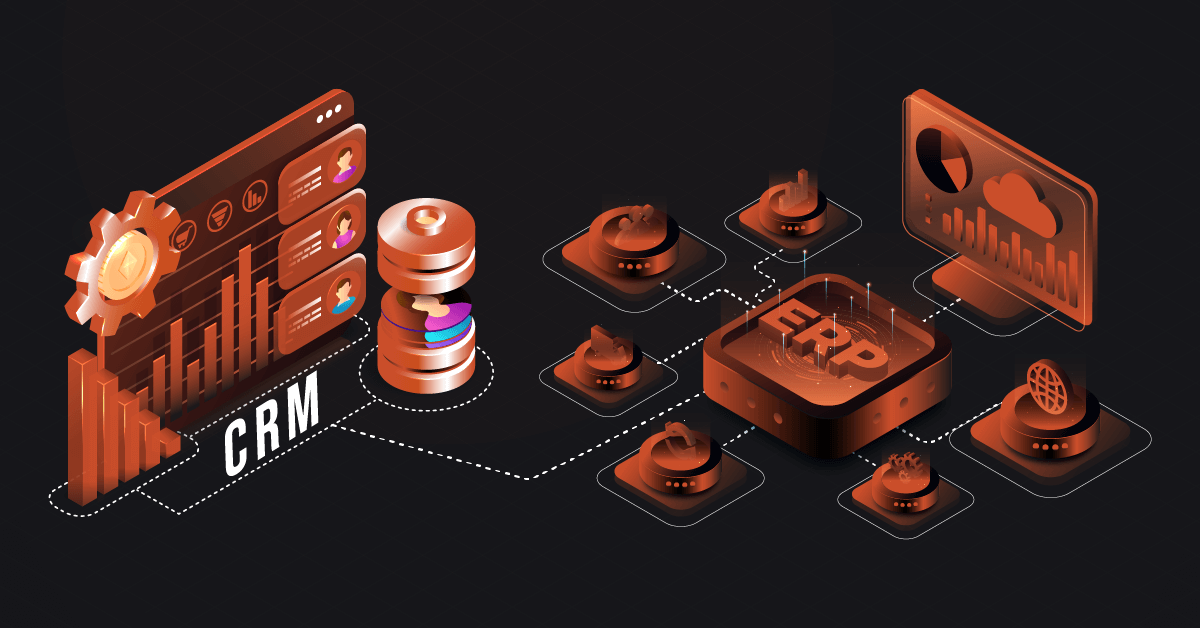
CRM middleware sits between your customer relationship management system and everything else in your tech stack. It handles the movement of customer data, order information, support tickets, and marketing interactions across applications that weren’t built to talk to each other.
Without middleware, you’re stuck with disconnected systems. Sales data lives in your CRM. Order history sits in your ERP. Support tickets exist in a separate help desk platform. Your team wastes time jumping between applications, and customer information becomes fragmented and unreliable.
Middleware solves this by creating automated data pipelines. When a sales rep closes a deal in your CRM, middleware pushes that information to your accounting system, triggers fulfillment processes, and updates inventory counts. No manual data entry. No delays. No errors from copying information between systems.
| There’s a good reason why it follows ecommerce – ERP integrations as our most frequently requested system to be synced via DCKAP Integrator. |
Core Functions and Capabilities of CRM Middleware
Data Transformation and Mapping
Different systems store information in different formats. Your CRM might use “Company Name” while your ERP expects “Account_Name.” A middleware translates these formats automatically.
Field-level mapping ensures data lands in the right place. Date formats convert between systems. Currency values adjust for regional differences. Custom fields in one system map to standard fields in another.
Business Logic and Workflow Automation
Middleware executes rules based on your business processes. If a customer’s credit limit gets exceeded, the system can pause order processing and alert your finance team.
Conditional routing sends data to different destinations based on specific criteria. High-value deals might trigger notifications to senior management. International orders could route through compliance checks before processing.
Error Handling and Monitoring
When something breaks, middleware catches it. Failed API calls retry automatically. Data that doesn’t validate gets flagged for review. Your team receives alerts when critical integrations stop working.
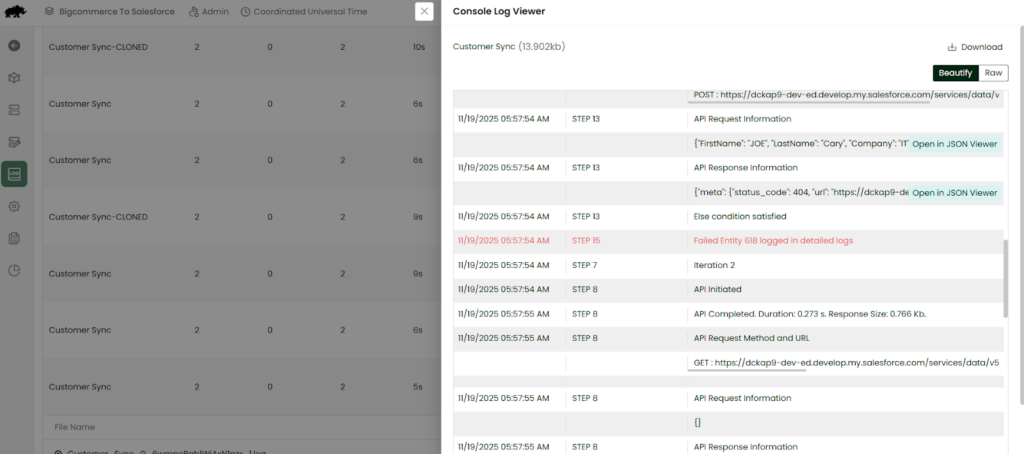
Logging capabilities track every transaction. You can see exactly what data moved, when it moved, and whether it succeeded. This audit trail proves invaluable during troubleshooting.
Security and Authentication
Middleware manages credentials for multiple systems. It handles OAuth tokens, API keys, and certificates. Data encryption protects information in transit.
Access controls determine which users can configure integrations. Role-based permissions ensure only authorized personnel can modify workflows or view sensitive data.
Architectural Approaches to CRM Middleware
Point-to-Point Integrations
This approach creates direct connections between your CRM and each additional system. CRM talks to ERP. CRM talks to marketing automation. CRM talks to help desk software.
Point-to-point works fine for small tech stacks. Two or three integrations remain manageable. But complexity explodes as you add systems. Five applications require ten integration points. Ten applications need forty-five connections.
Maintenance becomes a nightmare. When you upgrade your CRM, you might need to update every integration. If you replace one system, you rebuild all its connections.
Hub-and-Spoke Models
Hub-and-spoke architecture uses your CRM as the central hub. Every other system connects only to the CRM. This reduces the number of integration points significantly.
The CRM becomes the master data repository. All customer information flows through it. Other systems push updates to the CRM and pull information as needed.
This model works well when your CRM truly serves as the system of record for customer data. It struggles when other systems need to communicate with each other directly without involving the CRM.
CRM Middleware Solutions
Enterprise Service Bus (ESB) and Message-Oriented Middleware
An ESB creates a centralized integration layer. Applications publish messages to the bus. Other applications subscribe to the messages they need. The bus handles routing, transformation, and delivery.
Message-oriented middleware uses queues to manage asynchronous communication. Systems send messages without waiting for immediate responses. The middleware ensures delivery even when receiving systems are temporarily offline.
These approaches excel in complex enterprise environments. They handle high transaction volumes and provide guaranteed message delivery. But they require significant infrastructure and expertise to implement.
Integration Platforms for CRM Integration
Integration platforms provide cloud-based middleware without infrastructure management. You configure integrations through web interfaces or visual workflow builders. The vendor handles servers, scaling, and maintenance.
Pre-built connectors for popular CRM systems speed up implementation. You’re not writing API calls from scratch. Templates for common integration patterns get you started quickly.
The pricing for these integration platforms typically follows subscription models. Costs scale with usage—data volume, number of integrations, or API calls consumed. This makes them accessible to organizations that can’t justify traditional middleware infrastructure.
Also see: CRM Data Integration: A Comprehensive Guide
Common CRM Middleware Use Cases
Quote-to-Cash Automation
A sales rep generates a quote in the CRM. Middleware pulls current pricing from the ERP, applies appropriate discounts, and calculates tax. Once the customer approves, the quote converts to an order.
The order data flows to fulfillment systems. Inventory gets allocated. Shipping labels generate. The accounting system creates an invoice. Payment processing happens automatically. The CRM updates to reflect order status.
Customer Support Integration
When a customer calls support, the agent sees complete interaction history. Middleware aggregates data from the CRM, order management system, and previous support tickets.
Support teams can create orders, process returns, or update account information. These changes sync back to the CRM and other relevant systems immediately.
Marketing Campaign Management
Marketing automation platforms integrate with CRMs to track campaign performance. Someone downloads a whitepaper. CRM Middleware creates or updates their CRM record. Lead scoring algorithms run based on engagement data.
When leads reach qualification thresholds, they route to sales automatically. Sales reps see which content prospects engaged with and what triggered the lead assignment.
Multi-Channel Commerce
Customers interact through websites, mobile apps, phone orders, and physical locations. Middleware keeps all channels synchronized with your CRM.
An online purchase updates customer lifetime value. Store associates can easily see ecommerce order history. Website personalization reflects in-store purchases. Customer service accesses the complete cross-channel picture.
Financial Reporting and Analytics
Finance teams need customer data from CRMs combined with transaction data from ERPs. Middleware pushes this information to business intelligence tools or data warehouses.
Reports show metrics like customer acquisition cost, lifetime value, and revenue per account. Analysis happens on current data without manual exports or spreadsheet wrangling.
Key Features to Look for in CRM Middleware Solutions
Pre-Built Connectors
Check whether the middleware supports your specific CRM and the other applications in your stack. Generic REST API support isn’t enough. You want connectors that understand the data models of your systems.
Count the available endpoints. Some connectors only support basic functions. You might need access to custom objects, metadata, or administrative functions.
Visual Workflow Designer
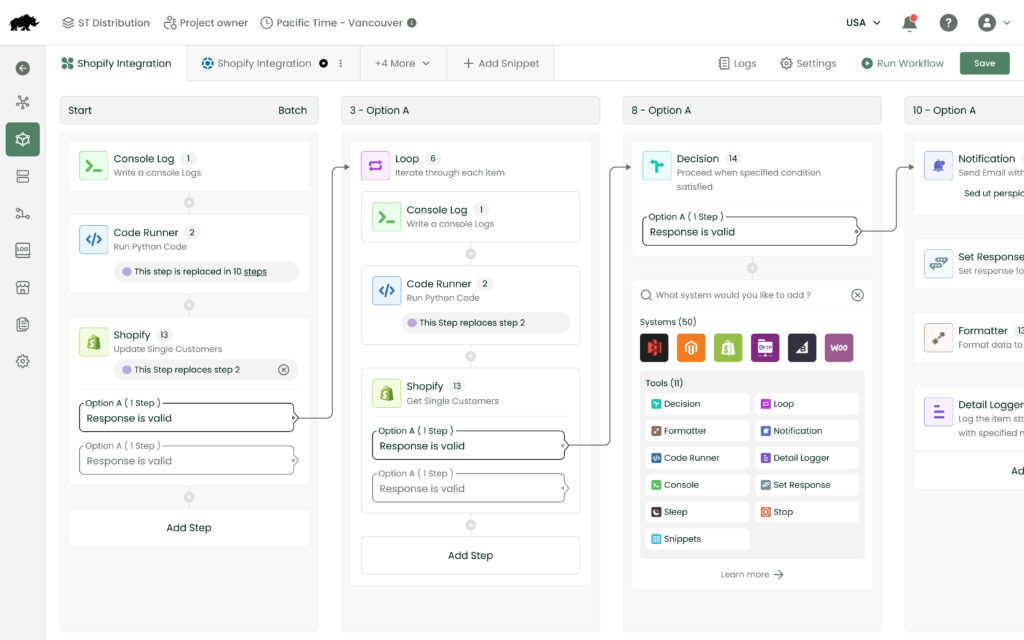
Non-technical staff should be able to configure common integrations. Drag-and-drop interfaces reduce dependence on developers for routine changes.
The designer should show data flow clearly. You want to see what happens when conditions are met, where errors get handled, and how different branches of logic connect.
Version Control and Testing
Integration workflows change over time. Version control lets you track modifications, compare versions, and roll back when needed.
Testing capabilities allow you to validate changes before they affect production data. Sandbox environments let you experiment without risk.
Performance and Scalability
Understand how the middleware handles volume. What happens when you need to sync 100,000 customer records? How does it manage API rate limits?
Batch processing capabilities matter for large data operations. Real-time sync handles individual record changes. You need both.
Monitoring and Alerting
Real-time dashboards show integration health. You can see active workflows, success rates, and processing times.
Alerting should be configurable. Different failures require different responses. A single failed transaction might just need logging. A complete integration outage demands immediate attention.
Data Governance
Field-level security controls who can access sensitive information. Encryption protects data at rest and in transit.
Compliance features help meet regulatory requirements. Audit logs track data access and modifications. Data residency options keep information in specific geographic regions when required.
Implementation Best Practices for CRM Middleware
Map Your Data Flows First
Document how information moves through your organization today. Which systems create customer records? Where does product information come from? Who updates pricing?
Identify the authoritative source for each data type. One system should own customer addresses. Another owns inventory counts. The middleware needs to respect these ownership boundaries.
Start Small
Pick one high-value integration to implement first. Quote-to-cash automation often provides quick wins. Or choose a pain point that causes the most manual work.
Prove the concept with limited scope. Get it working reliably. Then expand to additional use cases.
Define Data Standards
Establish naming conventions before you begin. How will you handle customer IDs across systems? What format will dates use? How do you represent currencies?
Create a data dictionary that documents these standards. Every integration should follow the same rules.
Plan for Errors
Integrations fail. APIs go down. Networks have problems. Design error handling from the start.
Decide what happens when a sync fails. Does the transaction retry? How many times? Who gets notified? What information do they need to resolve the issue?
Test with Real Data
Sandbox testing catches obvious problems. But production data reveals edge cases you didn’t anticipate.
Use a phased rollout. Start with a small subset of records or users. Monitor closely. Expand gradually as confidence builds.
Document Everything
Write down why you made specific design decisions. Future you will forget. Future team members never knew.
Document the business logic embedded in workflows. Someone will need to modify this integration someday. Make their job easier.
Monitor Continuously
Set up monitoring before you go live. Establish baseline performance metrics. Define what “normal” looks like.
Review logs regularly even when everything appears to work. Small problems often signal bigger issues developing.
Train Your Team
People need to understand how integrated systems behave. When they update information in the CRM, what happens in other systems? How long do changes take to propagate?
Create documentation for common scenarios. What should users do when they encounter errors? Who handles escalations?
Examples of CRM Middleware Solutions
DCKAP Integrator
DCKAP Integrator is the ERP-first integration platform for distributors. We specialize in connecting ERPs with CRMs, ecommerce platforms, and other systems common in wholesale and manufacturing.
The focus on specific industries means deeper functionality for relevant use cases. DCKAP understands distributor workflows—pricing matrices, customer-specific catalogs, and complex order processing.
DCKAP also supports both cloud and on-premises deployment. Organizations with strict data residency requirements or legacy infrastructure can keep integrations running locally.
And with a team of talented experts in ERP integration, customers can offload the entire set up and customization process to DCKAP.
MuleSoft Anypoint Platform
MuleSoft offers enterprise-grade iPaaS with extensive connector libraries. It supports complex integration patterns and handles high transaction volumes. Organizations with sophisticated requirements and technical resources often choose MuleSoft.
The platform includes API management capabilities alongside integration features. This makes it suitable for companies building customer-facing APIs in addition to internal integrations.
Boomi
Boomi provides cloud-native iPaaS with a visual interface. It includes pre-built processes for common integration scenarios. Its AtomSphere technology enables deployment flexibility—cloud, on-premises, or hybrid.
Boomi’s subscription pricing scales with connections rather than data volume. This benefits organizations with modest data transfer needs but many integrated applications.
Workato
Workato focuses on business user accessibility. The “recipe” builder uses plain language instead of technical terminology. Thousands of pre-built connectors and templates accelerate implementation.
Bot capabilities extend beyond traditional middleware. Workato can interact with applications that don’t have APIs through UI automation.
Zapier
Zapier targets smaller organizations and simpler use cases. The interface requires no coding knowledge. You create “Zaps” that trigger actions based on events.
While it has lmited customization constrains complex scenarios, it’s a good match for straightforward integrations like creating CRM contacts from form submissions.
To wrap it up
CRM middleware makes or breaks your ability to maintain accurate customer information across systems. Choose an approach that matches your technical capabilities and business complexity. Start with clear data governance. Build incrementally. Monitor constantly. Your customer experience depends on it.
To know how CRM middleware can help your business improve customer experience, schedule a chat with our integration experts today.
FAQs
What are the main benefits of CRM Middleware?
- Real-time data synchronization keeps information current across all systems. When a customer updates their shipping address, that change propagates everywhere it’s needed.
- Reduced manual work eliminates the need for employees to move data between applications. This frees up time for higher-value tasks and reduces human error.
- Better customer experience results from having complete information available. Support teams see purchase history. Sales reps access support ticket details. Marketing knows what customers bought.
- Scalability becomes possible as your tech stack grows. Adding a new application doesn’t require custom code for every existing system. The middleware handles the connection.
- Data quality improves when there’s a single source of truth. Middleware can validate, transform, and cleanse data as it moves between systems.
How long does it take to implement CRM middleware?
Timeline depends on integration complexity and your existing infrastructure. A simple two-system sync might go live in a few weeks. Complex enterprise deployments can take several months.
Count on us to have your integrations live in weeks not months.
What’s the difference between CRM middleware and an API?
An API is an interface that lets one application talk to another. Your CRM has an API. Your ERP has an API. But APIs don’t connect themselves.
Middleware uses those APIs to move data between systems. It handles authentication, data transformation, error handling, and workflow logic. Think of APIs as phone numbers and middleware as the phone system that connects the calls.
Can middleware work with legacy systems that don’t have modern APIs?
Yes, but it gets more complicated. Some middleware can connect to databases directly. Others use file-based integrations—exporting CSVs from one system and importing them into another.
We have experience working integrating systems as well, so don’t hesitate to reach out to understand how this would work for your systems.
Do I need dedicated IT staff to manage middleware?
Not always. Modern integration solutions target business users with visual interfaces and pre-built connectors. Someone technical enough to understand data mapping can handle basic configurations.
Complex implementations need technical expertise. Custom transformations require scripting knowledge. Performance optimization and troubleshooting benefit from IT involvement.
Working with DCKAP allows you flexibility either way. Your in-house team can handle the integrations if needed, but if you’d like to offload the setup and maintenance to our integration experts, we’re more than happy to handle that for you.
What’s the biggest mistake organizations make with CRM middleware?
- Trying to integrate everything at once.
- Ambitious projects that touch ten systems simultaneously usually fail or drag on for months.
- Starting without clear data governance causes ongoing problems. When multiple systems claim ownership of the same information, conflicts multiply.
- Ignoring change management hurts adoption. People need training on how integrated systems behave differently than disconnected ones. They need to understand new workflows and responsibilities.