CPQ projects often focus heavily on configuration logic and pricing accuracy. That makes sense, those are the visible wins.
What doesn’t get equal attention is what happens after the quote is generated.
- How does that data move to ERP?
- Is inventory validated in real time?
- Do pricing rules match financial systems?
- Does the order flow cleanly into fulfilment?
That second phase, CPQ integration, is where long-term efficiency is decided.
Methods and Deployment Approaches
Before choosing any method, you need to decide if you want to get it done in-house or go ahead with an external service provider. This breakdown will help:
In-House Integration
This means your internal team builds and manages the integration. They design it, connect the systems, test it, and fix it when something breaks. It gives you full control but it also means full responsibility. Within in-house integration, you can go about a few ways:
Direct Connection (Point-to-Point)
This is the simplest way to integrate. It’s just like two people talking directly on the phone. CPQ talks straight to ERP. No middle person or an extra layer. When something happens in CPQ, like a quote getting approved, it immediately sends that information directly into ERP. ERP can also send data back the same way. It’s simple and fast.
But the catch is that if CPQ also needs to talk to CRM, inventory systems, tax engines, and ecommerce platforms, now you have many direct lines everywhere. It becomes messy quickly. So, this works best when you’re connecting just one or two systems and when your setup isn’t too complex. Here are the two types of direct connections:
- Native Integration
If your CPQ and ERP are from the same vendor ecosystem, they may already have built-in integration options. Your team just configures and activates them. It’s simpler, but you stay tightly tied to that ecosystem.
- Pre-Built Connectors
Some CPQ tools offer ready-made connectors for common ERPs or CRMs. These reduce development time. But if your workflows are complex, your team may still need to customize them. In short: more control, more internal effort.
External Vendor / Third-Party Integration Platform
In this case, you outsource the integration to a third party service provider instead of building and managing it internally. They handle data mapping, configuration, error monitoring and ongoing support.
The benefits are many, like less pressure on your IT team, better visibility, easier scalability when you add new systems later, you save a lot of time and your team can focus on more important things and finally you save on the costs of redoing and fixing things. So, you do rely on a third party, and there’s a cost. But the flexibility and stability are often worth it. The most common option here is using a middleware.
Middleware
Going back to the previous example, imagine instead of everyone calling each other directly, there’s one central assistant handling all communication. That assistant is middleware.
Here’s how it works: CPQ sends information to the middleware. The middleware checks it, formats it properly, and passes it to ERP, CRM, or wherever it needs to go. Instead of building five different connections, you build one connection to the middleware, and it handles the rest. This is cleaner, easier to manage, and better when you have many systems.
| Editor’s note: One such middleware option is DCKAP Integrator. It supports multiple integration methods including API-based connections and FTP-based file transfers (useful when APIs aren’t available) so businesses can combine different approaches like point-to-point, middleware, or file-based integration within the same platform as needed. |
Hybrid Approach
Many businesses combine both. Maybe they use native integration for simple data sync and a third-party platform for complex workflows. This usually happens as systems grow and processes become more layered.
File-Based Integration
This is an older but still common method. Instead of live communication, CPQ creates a structured file like a neatly formatted spreadsheet or data file and places it somewhere.
The ERP picks it up and reads it. It’s like dropping a letter in a mailbox instead of making a phone call. This is often used when working with legacy systems, connecting with external partners or supporting EDI transactions. You can choose to do this both in-house or with external vendors, depending on your internal resources.
In the end, what you choose depends on your business, your workflows and your future plans. So, choose wisely.
Also read: Middleware Integration Explained: Use Cases, Apps, and Methods
What Systems Should Your CPQ Be Integrated With?
A standalone CPQ can generate quotes, but an integrated CPQ drives business outcomes. Here are the systems you should consider for CPQ integration
ERP (Enterprise Resource Planning)
This is the most critical integration. Once a quote is approved, it shouldn’t just sit there. The ERP needs that data to create the sales order, trigger production or procurement, manage inventory allocation, generate invoices, and handle revenue recognition. Without this connection, someone ends up re-entering quote details manually, which slows everything down and increases the risk of pricing or quantity errors. When CPQ is integrated with ERP, the transition from “quote” to “order fulfillment” becomes automatic and clean.
CRM (Customer Relationship Management)
The CRM system manages leads, accounts, and opportunities, while CPQ solution handles configuration and pricing logic. If they operate separately, sales teams waste time copying customer details back and forth. When integrated, account data flows directly into CPQ, quotes attach to the right opportunity, and pipeline forecasting reflects actual quoted values instead of rough estimates. It keeps sales visibility accurate and avoids data duplication.
Product Information Management (PIM)
CPQ depends heavily on accurate product data like specifications, variants, compatibility rules, bundles, and updates. If product information lives in a separate system and isn’t connected, sales teams may configure quotes using outdated or incomplete data. Integration ensures that the pricing tool always reflects the latest product structure, technical details, and approved combinations. That protects both margin and credibility.
Inventory or Warehouse Management Systems
Quoting without stock visibility can create serious problems. Sales might promise products that are unavailable or commit to unrealistic delivery timelines. When CPQ is connected to inventory systems, availability data can be checked during the quoting process itself. This helps align what’s being sold with what can actually be fulfilled, reducing order corrections and customer frustration.
eCommerce Platforms
In businesses running both direct sales and online channels, pricing logic must stay consistent. If ecommerce and CPQ aren’t aligned, customers might see different prices online compared to what sales teams quote. Integration ensures pricing rules, discounts, and configurations remain synchronized across channels, maintaining consistency and avoiding confusion.
Billing and Subscription Management Systems
For companies offering recurring services, maintenance contracts, or subscription-based products, CPQ systems needs to pass structured pricing details into billing systems. Without integration, recurring charges can be miscalculated or manually adjusted. Connecting these systems ensures subscription terms, renewals, and pricing tiers flow directly into invoicing without gaps.
Approval and Workflow Systems
Many quotes require internal approvals based on discount thresholds or deal size. Integrating CPQ with approval systems ensures the right stakeholders are automatically notified, and approvals are logged and tracked. This avoids email-based approval chaos and keeps governance structured and auditable.
Also read: A Practical Guide to System Integration for B2B Businesses
Benefits of CPQ Integration
Lesser friction between teams
When CPQ is properly integrated, what sales configures is already aligned with what operations can fulfil. Pricing matches finance logic. Product rules reflect real-world constraints. An approved quote can move forward without three more internal checkpoints. That saves time, but more importantly, it removes friction between teams.
Pricing stays accurate
Pricing isn’t static, costs change. Contracts get updated, volume discounts shift, and special rates apply to certain clients. If CPQ isn’t connected to the system that holds the “official” pricing or cost data, it can drift out of sync. Sales organizations might not even realize they’re quoting based on outdated numbers.
Integration keeps pricing grounded in reality. Base prices, cost data, and contract rules pull from the source system automatically. That protects margins quietly in the background.
Inventory surprises reduce dramatically
There’s nothing more frustrating than quoting confidently and then discovering stock isn’t available. Without integration, availability checks often happen after the quote is sent. That leads to follow-up emails, revised timelines, or awkward calls. When CPQ can see live inventory data, sales know immediately what’s available, what’s low, and what might need a longer lead time. They can suggest alternatives on the spot instead of fixing problems later.
Quotes turn into orders without manual rework
In many setups, an approved quote still has to be manually entered into ERP as a sales order. That means retyping product codes, quantities, pricing, tax details, shipping terms. Every manual step is an opportunity for error. With proper integration, the quote flows directly into the order system. That speeds up processing and reduces admin effort, especially when order volumes are high.
Data remains consistent everywhere
When systems aren’t connected properly, reports don’t match. That creates confusion, especially during forecasting or performance reviews. Integrated systems keep product data, pricing, and customer information aligned. That means reports are cleaner, forecasts are more reliable and leadership doesn’t have to reconcile numbers from three different spreadsheets before making a decision.
Scaling becomes less challenging
As product lines expand or pricing models evolve, complexity increases. New SKUs, new bundles, new regions, new rules. If CPQ sits in isolation, every change needs manual alignment across systems, that’s where mistakes creep in. With seamless integration in place, updates sync automatically. New products appear correctly. Pricing structures stay consistent. Growth feels structured instead of stressful.
Less manual patchwork for IT
Disconnected systems usually lead to workarounds. CSV uploads. Custom scripts. Temporary fixes that become permanent. Over time, IT ends up maintaining fragile connections instead of improving systems. A clean integration setup reduces those constant small fixes. It creates a stable foundation so teams aren’t always reacting to sync errors.
Customers feel the difference
They don’t know whether systems are integrated. But they notice when quotes are accurate the first time. When pricing is consistent. When delivery dates don’t change after approval. That consistency builds confidence, even if no one talks about integration directly.
Also read: ERP Integration With Other Systems: Methods, Best Practices & What You’re Risking Without It
Top Tool to Integrate Your CPQ: DCKAP Integrator
If you want your CPQ software connected to the rest of your business without creating a messy network of point-to-point integrations, you need a structured integration layer like DCKAP Integrator.
It’s an ERP-first integration platform designed to make all your business systems work together while treating ERP as the single source of truth. Instead of connecting CPQ separately to CRM, ecommerce, inventory, and finance tools, everything flows through one controlled layer aligned around your ERP.
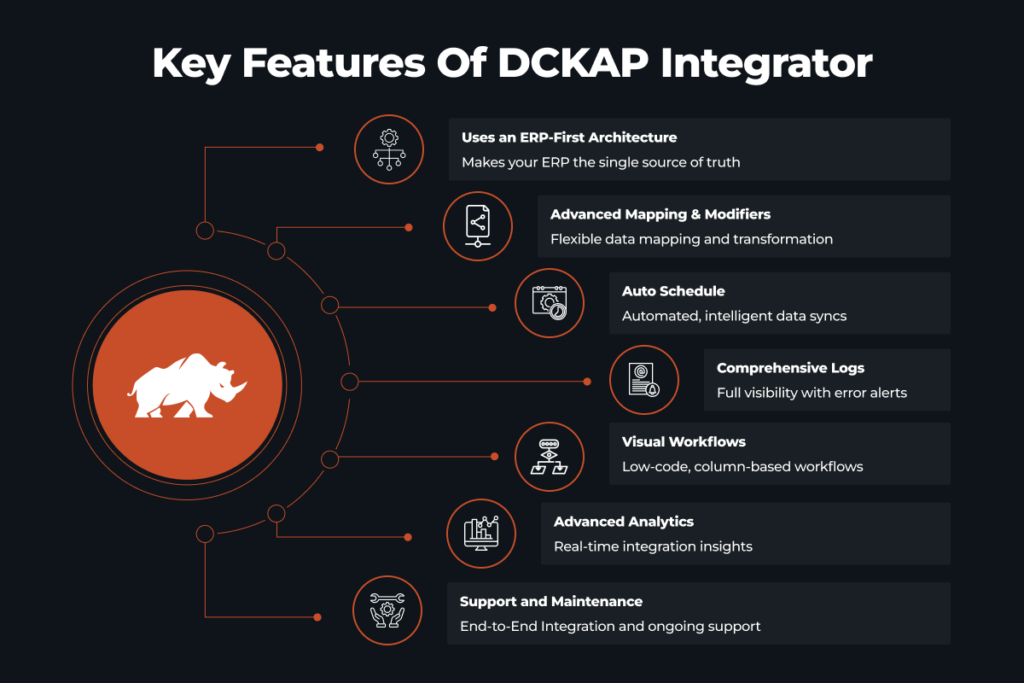
Here’s what you actually get:
- Deep customization for complex and unique workflows
- Support for heavy, distributor-specific workloads
- Real-time and batch integrations
- Clear monitoring and error visibility
- Transparent pricing
- Dedicated, hands-on support
If your business requires layered approvals, complex product rules, custom fields, or unique ERP structures, the team handles that for you. You’re not forced into rigid templates. In short, DCKAP Integrator makes CPQ integration structured, scalable, and hassle-free, especially for businesses where ERP accuracy and operational timing truly matter. To know more, get in touch!
FAQs
What are the top CPQ tools available in the market?
Some of the most recognized CPQ tools include Salesforce CPQ, Oracle CPQ, SAP CPQ, Epicor CPQ, and CPQ solutions built within Microsoft Dynamics 365.
How does CPQ integration improve the sales cycle?
CPQ integration shortens the sales cycle by removing manual data entry and reducing manual errors. When customer data, price logic, and approvals sync between CRM and ERP systems, sales reps no longer recreate documents or re-enter contact information. Accurate quotes move directly into order creation, reducing human error and speeding up deal closure.
What are best practices for seamless CPQ integration?
- Keep ERP systems as the central source of truth
- Clearly define where price, product, and customer data are controlled
- Test real-world sales scenarios before go-live
- Minimize manual data entry points to reduce human error
- Align integration design with your actual sales process, not just technical endpoints
When implemented correctly, seamless CPQ integration reduces administrative tasks, improves accuracy, and strengthens the overall sales process.
What are the common challenges during the integration process?
Even with powerful solutions, challenges can arise during the integration process:
- Data inconsistencies between CRM software and ERP systems
- Poorly defined ownership of customer data or price rules
- Complex pricing structures that are hard to replicate in CPQ
- Manual errors during migration of legacy data
- Misalignment between sales organization workflows and technical configuration
- Integration strain when handling complex products tied to supply chain constraints