From the customer’s point of view, your business is one system.
It doesn’t matter which tool stores their order, invoice, or support request. They expect quick answers, accurate information, and smooth follow-ups.
With Creatio ERP Integration:
- Sales knows order status
- Support sees billing details
- Account managers have full context
This connected experience is hard to achieve when systems operate separately.
Ways to Integrate with Creatio
Creatio is built to work well with other applications. Whether you want to pull data into Creatio, send data out, or trigger actions in another system, Creatio gives you multiple ways to do that.
Broadly, integration with Creatio works in two directions:
- External applications integrating with Creatio
- Creatio integrating with external applications
Let’s get into the details
1. Integrating External Applications with Creatio (When another system wants to talk to Creatio)
This is useful when you want your ERP or another app to read data from Creatio or update data inside Creatio.
a) Data Services (for working with Creatio data)
If your main goal is to create, read, update, or delete data in Creatio, data services are the most common option.They allow other applications to safely access Creatio’s data.
Creatio provides two main data service options:
- OData (Most commonly used): OData is a standard way for applications to talk to each other using simple web requests (like GET, POST, PUT).
- DataService (Creatio’s internal service): DataService is a Creatio-built service mainly used to pass data from the front end to the back end.
b) Running Creatio Business Processes from Another App
Sometimes, you don’t just want to update data, you want Creatio to run a workflow or business process.
For example:
- Start an approval process
- Trigger a follow-up task
- Launch an automation flow
For this, Creatio provides a system web service that allows external applications to start business processes inside Creatio and pass the required data while starting the process. This is helpful when Creatio is acting as the automation engine.
c) Custom Web Services
If your integration needs are very specific, Creatio allows you to:
- Create custom REST web services
- Design them exactly based on your business logic
This approach is usually chosen when:
- Standard services are not enough
- You have complex rules or validations
- You want full control over the integration behavior
2. Integrating Creatio with External Applications (When Creatio needs to talk to other systems)
In this case, Creatio is the one reaching out to your ERP system. You have two main approaches here:
a) Build a Custom Integration
Creatio provides tools that allow you to:
- Connect to external REST APIs
- Call those APIs directly from Creatio business processes
- Exchange data without writing heavy code
This is useful when:
- You’re integrating with a custom-built system
- The external app doesn’t have a ready-made connector
- You need flexible logic
Although integrations can be done with minimal or no developer involvement using Creatio’s built-in tools, it’s still best to integrate under proper technical guidance.
b) Use Out-of-the-Box Integration Solutions
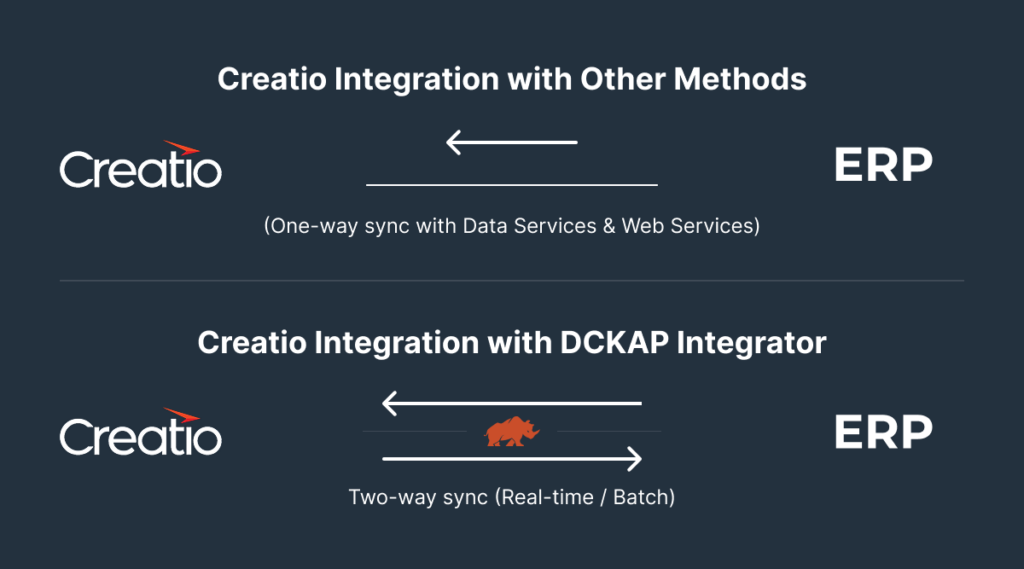
Sometimes, building an integration from scratch is not the best way forward. This is where third-party integration platforms come in.
These platforms act like a middle layer between Creatio and other applications. Instead of Creatio talking directly to every system, the integration platform handles the communication for you.
They usually come with:
- Pre-built connectors for popular applications
- Visual, drag-and-drop workflows
- Built-in error handling and retries
- Easier monitoring and maintenance
This means you don’t have to worry about:
- API changes
- Complex data transformations
- Writing and maintaining a lot of custom code
Because there are multiple ways for Creatio to connect with external systems, and also for external systems to connect back to Creatio, managing these connections individually can become complex over time.
This is where third-party integration platforms become even more ideal. They support both one-way and bi-directional data sync, meaning data can move smoothly in both directions, and they act as a central layer that connects all the systems in your tech stack.
Instead of building and maintaining separate integrations for each application, you manage everything in one place. We’ll explore this approach in more detail later in the blog.
Recommended reads: Magento ERP Integration Explained [+Case Studies]
Benefits of Creatio ERP Integration
Connecting Creatio with your ERP helps different teams work with the same data, without confusion or manual effort. Instead of information being scattered across systems, everything starts to flow in a more connected way.
Here are the key benefits.
1. Faster and More Accurate Billing
When Creatio is integrated with your ERP, billing-related information doesn’t need to be entered multiple times. Sales data from Creatio can flow directly into the ERP for invoicing, payments, and financial processing.
This means fewer billing errors, faster invoice generation and less back-and-forth between sales and finance teams.
2. A Complete 360-Degree View of the Customer
Creatio holds customer conversations, deals, and interactions.The ERP holds orders, invoices, payment status, and fulfillment details. When both systems are connected, teams get a single, complete customer profile. Sales, support, and account managers can see the full picture without jumping between tools.
3. Elimination of Duplicate Data Entry
One of the biggest pain points in disconnected systems is entering the same data again and again. With Creatio ERP integration customer details are created once and reused everywhere.
Order and account data stays consistent and manual updates are reduced. This saves time and significantly lowers the risk of human error.
4. Stronger Reporting and Analytics
When CRM and ERP data come together, reporting becomes more meaningful.
Businesses can analyze sales performance alongside revenue and billing data, track customer lifetime value more accurately, make better decisions using real, connected data. This improves both strategic planning and day-to-day decision-making.
5. Better Alignment Between Teams
Sales, finance, operations, and support often work in silos because they use different systems.
Integration helps sales understand delivery and payment status, finance see what’s happening in the sales pipeline and support can respond faster with accurate information. So, everyone works with the same context, which reduces friction and miscommunication.
6. Improved Customer Experience
When internal systems are connected, customers feel the difference. Teams can respond faster, provide accurate updates, and avoid mistakes caused by missing or outdated information. Over time, this builds trust and improves overall customer satisfaction.
7. A Scalable Foundation for Growth
As businesses grow, manual work and disconnected systems become harder to manage.
Creatio ERP integration creates a stable, scalable foundation that supports higher transaction volumes, More customers, Additional tools in the tech stack without constantly reworking processes.
Common Use Cases for Creatio ERP Integration
1. Lead-to-Order Flow
Sales teams manage leads, opportunities, and deals in Creatio. Once a deal is won, the order details need to move to the ERP for processing.
With integration:
- Confirmed deals in Creatio create or update orders in the ERP
- Key details like customer info, products, pricing, and quantities flow automatically
- Manual handoffs between sales and operations are reduced
This helps sales close deals faster while operations work with accurate data.
2. Quote-to-Cash Process
Quoting often starts in Creatio, but billing and payments are handled in the ERP.
Integration allows:
- Quotes created in Creatio to sync with ERP pricing and tax rules
- Approved quotes to turn into invoices automatically
- Payment status to be visible back in Creatio
This keeps revenue processes smooth and predictable.
3. Customer and Account Synchronization
Customer data often exists in both Creatio and the ERP.
With integration:
- New customers created in Creatio are reflected in the ERP
- Updates to billing or legal details in the ERP sync back to Creatio
- Duplicate records are avoided
Teams work with one consistent customer profile across systems.
4. Order and Invoice Visibility for Sales Teams
Sales and account managers don’t usually work inside ERP systems, but they still need visibility.
Integration enables:
- Order status updates to appear in Creatio
- Invoice availability and payment status to be visible to sales and support teams
- Fewer internal follow-ups with finance teams
This improves response time and customer communication.
5. Inventory and Product Availability Checks
For businesses that sell physical products, inventory lives in the ERP.
When integrated:
- Creatio can display real-time or near real-time product availability
- Sales teams avoid promising unavailable stock
- Order accuracy improves
This is especially useful for distribution and manufacturing businesses.
6. Billing and Finance Alignment
Finance teams rely on the ERP, while sales teams live in Creatio.
Integration helps:
- Sales understand billing cycles and payment delays
- Finance receive cleaner, validated sales data
- Disputes caused by mismatched records are reduced
Everyone works with shared context.
7. Renewals and Contract Management
For subscription or contract-based businesses usually contract details are managed in Creatio while billing and renewals are handled in the ERP
Integration ensures:
- Renewal reminders are based on accurate billing data
- Sales teams have visibility into contract status
- Missed renewals are reduced
8. Reporting and Business Insights
When CRM and ERP data come together:
- Pipeline data can be analysed alongside revenue
- Customer lifetime value becomes more accurate
- Leadership gets a clearer picture of performance
This supports better planning and forecasting.
Recommended reads: A Complete Guide to PayTrace ERP Integration for Seamless Payment Processing
Challenges and Solutions of Creatio ERP Integration
1. Different data structures and field mapping
CRMs and ERPs store the same things differently (e.g., full name vs first/last fields), making automated syncs fragile.
Solution: Create a simple mapping document listing each field in Creatio and its counterpart in the ERP. Use a middleware that provides visual mapping and transformation rules so you can convert formats (dates, phone numbers) without heavy coding. Test mapping with real records.
2. Creatio is flexible, but ERP systems are rigid
Creatio is highly configurable. Fields, workflows, and objects are often customized to match how a business works. ERP systems, on the other hand, usually follow stricter structures.
This difference often causes friction when syncing data between the two.
Solution: Decide early which system drives structure. Keep Creatio flexible for customer-facing processes, but align critical data (like product codes, tax rules, and pricing logic) with the ERP. Avoid over-customising core objects in Creatio unless the ERP can support it.
3. Unclear ownership of customer data
Creatio often becomes the primary place for customer information, while the ERP may also store customer records for billing and compliance. Without clarity, updates can overwrite each other.
Solution: Clearly define data ownership.
For example:
- Creatio owns contacts, activities, and communication history
- ERP owns billing, tax, and payment-related fields
Once this is clear, bi-directional sync becomes predictable instead of risky.
4. Multiple integrations built in different ways over time
While most businesses work with a single ERP, integrations are often built at different points in time to solve different problems. As a result, the same ERP may be connected to Creatio through a mix of custom code, APIs, and scripts. Over time, this creates complexity and makes integration harder to manage.
Solution: Standardize the integration approach. Use a single integration layer or platform to manage all ERP-related connections. This reduces technical debt and makes future changes easier.
Making Creatio ERP Integration Easier with DCKAP Integrator
A successful Creatio ERP integration depends heavily on how the overall integration architecture is designed.
Instead of building multiple point-to-point connections, many businesses choose to keep the ERP as the single source of truth and connect all other systems around it. This approach reduces complexity and keeps data consistent.
DCKAP Integrator follows this ERP-first model, making it easier to integrate Creatio with ERP systems and extend those integrations to other tools as the business grows.
Along with the core integration capabilities, it offers:
Advanced logging and tracking
Every data movement is logged clearly, making it easy to see what moved, when it moved, and where something might have failed. This helps teams troubleshoot issues without guesswork.
Error alerts and notifications
When something goes wrong, teams don’t have to find out later. Automated alerts highlight failures or delays so problems can be addressed quickly, before they impact operations or customers.
Built-in workflow design
Integrations are not just about data sync. DCKAP Integrator includes workflow capabilities that allow businesses to design and manage integration logic directly within the platform. This makes it easier to handle validations, transformations, and process steps without building everything from scratch.
Intuitive interface
The platform is designed to be easy to navigate, even for teams that are not deeply technical. Integration flows, mappings, and workflows are visible and easy to understand.
Reliable support
Strong support plays a big role in long-term integration success. DCKAP Integrator provides dependable assistance when teams need help with setup, optimisation, or scaling integrations.
Transparent pricing
Clear and predictable pricing makes it easier for businesses to plan integrations without unexpected costs as requirements grow.
Plus, this works well because Creatio is flexible and process-driven, which makes it ideal for customer-facing workflows. When integrated through an ERP-first platform like DCKAP Integrator:
- Creatio receives accurate, validated data from the ERP
- Business processes in Creatio stay aligned with backend operations
- Integration logic is managed in one place instead of across multiple scripts or APIs
So, if you’re exploring Creatio ERP integration and want to see how an ERP-first integration platform works in practice, check out a live demo of DCKAP Integrator to understand how it can fit into your integration strategy.