Product data sync is the continuous or scheduled process of keeping your product catalog consistent and accurate across every system that needs to display or reference it. The data in scope includes:
- Item descriptions, specifications, and attributes
- Images, dimensions, and weights
- Classification codes, certifications, and compliance data
- Cross-reference numbers and alternate part identifiers
In an ERP, a product record is authoritative but typically sparse: SKU, description, unit of measure, cost, and a handful of logistics attributes. The systems that consume product data need far more. Ecommerce platforms, customer portals, EDI networks, and CRMs need marketing copy, multiple images, compatibility information, and structured technical specifications.
Product data sync bridges the gap between the ERP as the master record of what a product is from a transactional standpoint, and the downstream systems that communicate what it is to the people buying or selling it.
Where Product Data Needs To Flow
Several systems can enrich and store product data within an organization, so connecting them to your ERP is key to ensuring access to real-time information.
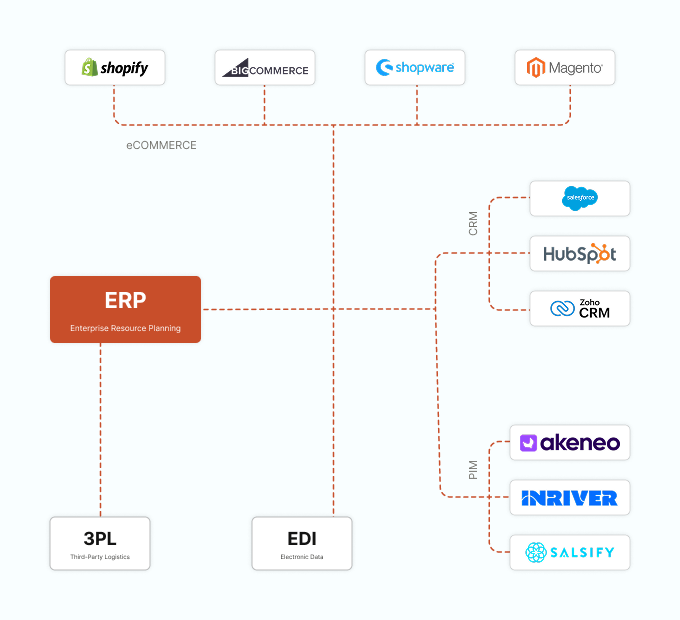
ERP to B2B Ecommerce Platform (Shopify B2B, BigCommerce, Magento, custom portals): The ecommerce platform needs a complete, current product catalog. When a new SKU is introduced in the ERP, it must appear on the ecommerce site. When a product is discontinued, it must be removed or suppressed. Attributes, units of measure, and item numbers must match exactly so that orders placed online translate cleanly back to the ERP without manual intervention.
ERP to CRM (Salesforce, HubSpot): Sales representatives need visibility into the product catalog to build quotes, propose alternatives, and discuss availability. When product lines expand or contract, the CRM must reflect those changes so that reps are not quoting phantom products or missing new additions.
ERP to EDI and Trading Partner Networks: Retail and distribution partners, particularly large ones, often require electronic product catalogs transmitted via EDI, commonly ANSI X12 832 Price/Sales Catalog or GS1 data pools. These must be sourced from the ERP and enriched with the additional attributes EDI recipients require.
ERP to PIM (Product Information Management) Systems: In larger organizations, a PIM such as Akeneo, inRiver, or Salsify sits between the ERP and downstream channels. The ERP feeds core item data into the PIM; the PIM enriches it and distributes it. The sync between ERP and PIM is therefore foundational to all downstream product accuracy.
ERP to 3PL and WMS Systems: Warehouse and third-party logistics providers need accurate item master data, especially dimensions, weights, barcode data, and handling requirements, to receive, store, pick, and ship correctly.
Best Practices for Product Data Sync
Establish a single source of truth
The ERP should be the authoritative source for transactional attributes such as SKU, UOM, cost, and status. A PIM or product content layer should own marketing and enrichment attributes. Define this clearly and enforce it. Having multiple systems that “own” different parts of a product record leads to conflicts.
Use item status flags to control visibility
Before syncing a product to downstream systems, require it to pass through an approval or enrichment gate. An item that is active in the ERP but has no description, no image, and no assigned category should not auto-publish to the ecommerce site. Build status codes into your integration logic: “Active, Complete” triggers the sync; “Active, Pending Enrichment” does not.
Sync deletions and discontinuations, not just additions
Most integration projects handle the forward flow of new and updated products but neglect the reverse: removing or suppressing discontinued items. This leaves ecommerce sites littered with ghost products customers cannot actually order. Map ERP item status changes (discontinued, inactive, superseded) to corresponding visibility rules in downstream systems.
Include cross-reference and alternate part numbers
Many distributors’ customers search by manufacturer part number, not the distributor’s internal SKU. Ensure your product sync includes manufacturer part numbers, UPC codes, and any alternate item identifiers stored in the ERP, so that ecommerce search and EDI matching work reliably.
Version your product data
Maintain a history of changes to critical attributes like dimensions, weight, and hazmat classifications. If a product is re-spec’d by the manufacturer and the new data overwrites the old in all systems without any record, downstream problems such as mis-shipped freight and incorrect compliance documentation become nearly impossible to trace.
Test with sample orders after each major sync
After any bulk product data migration or large catalog update, run test transactions in both the ERP and connected systems to verify that items add to cart, price correctly, and create clean ERP sales orders without errors.
The Cost of Getting It Wrong
Inaccurate product data is one of the most silent and expensive problems in distribution and manufacturing. Common failure points include:
- Customers ordering the wrong item because descriptions were outdated
- Returns and re-ships caused by mismatched specifications
- Customer service calls driven by product information that differs between a website and a printed catalog
- Failed EDI transmissions when product codes do not match what a trading partner expects
For manufacturers, product data accuracy is also a compliance issue. Incorrect dimensions or weight data can cause shipping cost miscalculations or regulatory violations. For distributors carrying thousands of SKUs from dozens of suppliers, keeping product data consistent across all touchpoints is a significant ongoing challenge that, if not systematically addressed, becomes a persistent drag on customer experience and margin.
How DCKAP Integrator Makes Product Data Sync Easy And Effective
Rather than forcing your team to maintain parallel product records across the ERP, ecommerce platform, and CRM, DCKAP Integrator creates a single automated pipeline that keeps every connected system in step with your Epicor item master. Key capabilities include:
- No-code field mapping: Product records in Epicor and your ecommerce platform rarely share identical structures, field names, or data formats. DCKAP Integrator’s drag-and-drop mapping engine lets you combine fields, reformat values, apply conditional logic, and handle exceptions without writing code. ERP stores weight in ounces but ecommerce expects kilograms? The mapping layer handles it cleanly.
- Configurable sync frequency: Set product data to sync in real time the moment a record changes in the ERP, or schedule batch syncs at intervals that match your operational rhythm.
- Instant error visibility: When a product record fails to sync, the platform surfaces the issue immediately through its error logs and alerting system. Your team sees which records failed, why they failed, and can resolve and re-trigger the sync without contacting a developer.
- Multi-system flows out of the box: A single product data pipeline can simultaneously push to BigCommerce, update Salesforce, feed your 3PL’s item master, and prepare structured data for EDI partner catalogs, all managed in one console.
The right integration platform can make all the difference. And if you want to know how the ERP-first integration approach can help you with product data sync and more, simply schedule a chat with our integration experts.
FAQs
How often should product data sync between our ERP and ecommerce platform?
It depends on how frequently your catalog changes. For distributors adding or modifying products daily, a real-time or near-real-time sync triggered by ERP item record changes is ideal. For more stable catalogs, a scheduled sync running every few hours or overnight may be sufficient. The risk of infrequent syncing is that customers encounter outdated or unavailable products, which drives abandoned carts and support calls. DCKAP Integrator supports both event-driven and scheduled sync, so you can set the frequency that matches your catalog velocity.
What happens if a product exists in our ERP but is missing key attributes needed by the ecommerce platform?
This is one of the most common product sync challenges. The safest approach is to gate the sync using item status flags: only products that have completed a defined enrichment checklist in the ERP or PIM should be eligible to publish downstream. DCKAP Integrator allows you to build this conditional logic directly into the integration flow, so incomplete records are held back automatically rather than publishing with missing data that confuses customers.
Can we sync products to multiple ecommerce sites or storefronts from one ERP?
Yes, and this is increasingly common among distributors who serve different customer segments through separate branded storefronts. DCKAP Integrator supports multi-destination sync, meaning a single product data flow from your ERP can publish simultaneously to multiple ecommerce platforms or storefronts, with each destination receiving the data in the format and structure it requires.
How do we handle products that have different names or codes in our ERP versus what our ecommerce customers expect to see?
This is precisely what DCKAP Integrator’s field mapping and modifier capabilities address. You can configure the integration to transform any field during transit: applying formatting rules, substituting values, pulling from alternate fields like manufacturer part numbers, or concatenating multiple ERP fields into a single ecommerce display field. The result is that your customers always see clean, familiar product information even when the underlying ERP data is structured differently.
What is the best way to handle product discontinuations so they do not linger on our website?
Map your ERP item status codes to visibility rules in your ecommerce platform and configure DCKAP Integrator to sync status changes in real time. When an item is marked discontinued or inactive in Epicor, that status change triggers an immediate update to the ecommerce platform, either removing the product or setting it to a hidden or out-of-stock state. Without this, discontinued products remain visible to customers indefinitely, creating orders your team cannot fulfill.