If you decide to perform indirect or hybrid EDI integration, you’ll need to choose an EDI service provider to handle communications using different protocols and standards. These solutions fall into two categories:
Traditional EDI Providers
Traditional EDI providers offer the fundamental tools you need to implement EDI in your communications. This category includes VAN-based providers like SPS Commerce and True Commerce. Some businesses also use an integration platform as a service (iPaaS) that supports EDI, like Boomi or MuleSoft.
ERP-Native EDI Integration Platforms
With many businesses connected to the supply chain counting on enterprise resource planning (ERP) software as their main source of data, solutions like DCKAP EDI offer ERP-native EDI functionality. DCKAP EDI directly integrates with ERP software to automatically transfer data related to inventory, resources, and transactions.
Benefits of ERP-Native EDI Integration for Businesses in the Supply Chain
ERP-native EDI platforms especially suit businesses that work in the supply chain because of their ease of use with common systems. Distributors, manufacturers, retailers, and 3PLs can all benefit from increased efficiency related to the following perks.
Less Human Intervention
An ERP-native EDI integration like DCKAP EDI saves time spent entering EDI-related data into an ERP manually. The data from EDI transactions automatically flows to your ERP, updating critical details like inventory levels and budget expenses. You also won’t need an additional VAN or iPaaS in your stack, saving you time creating additional workflows.
Availability of Workflows
As you set up your ERP-native EDI system, you’ll be able to establish workflows for where each of your documents goes after a transaction. DCKAP EDI lets you set document-specific workflows to determine what data in your ERP gets updated. For example, you can set a purchase order to trigger a new order in your ERP.
Additional Integration Support
An EDI platform that integrates with your ERP can also integrate with your other main sources of truth, such as your WMS or transportation management system (TMS). Configure your EDI transactions to send data to relevant systems. DCKAP EDI, in particular, also supports APIs for further integrations.
Single Source of Truth
With an ERP-native EDI system, your ERP truly becomes your single source of truth. Many businesses consider their ERP their central knowledge hub, but ERPs generally don’t come with built-in EDI capabilities. With your ERP data automatically updating according to EDI transactions, you’ll have a real-time, singular source of truth to reference.
Better Business Partner Relationships
Automatic and accurate data exchange allows for fast and smooth communication with your business partners. This improved communication enables stronger relationships with your partners so they can also count on you for more business.
Cost Savings
Investing in an ERP-centric EDI solution can also reduce your yearly spend on EDI overall. A singular tool that can support multiple standards and integration will save you the costs you would spend on additional apps that perform those jobs. The additional automation capabilities will also save you human labor costs.
How to Implement an ERP-Native EDI Integration (+Best Practices)
ERP-native EDI integrations combine the best features of ERP integrations and EDI systems. So, the implementation process includes elements from both types of setup. Here are the steps to installing one of these integrations and best practices.
1. Prepare Your EDI and ERP Data for Integration
Ensure that your data matches the EDI standards for your industry and the formatting requirements for your computer application.
If you would like to change standards or plan on using EDI for the first time, establish what standards you will need to use to communicate with your partners. Choose standards that suit your industry as well as the standards your business partners use for EDI communications.
Clean data is key to workflows functioning correctly. Your integration app will offer setup instructions, including the data formatting required for smooth installation. If you work with an implementation team, follow their directions for data formatting as well.
💡 Best Practice: Take all the time you need to properly format all the data in your ERP and supporting tools. Duplicate entries, blank fields, and other data errors can cause integration problems down the road. Spending more time with data cleaning will save you much more time troubleshooting unexpected issues later.
2. Connect to Your ERP and Other Business Software
With your business data ready for integration, you can now connect your ERP and any other software you want to integrate with EDI. Ideally, your EDI solution will have out-of-the-box connections for major ERP names and the option for custom integration through APIs.
Consider setting up your connections and data in your EDI system in a sandbox environment before using it as a live integration. Your integration provider may offer a sandbox option. Or, you can build your own sandbox environment by limiting your first transactions to certain partners.
💡 Best Practice: Choose an EDI solution that provides strong implementation support and customer service to help you with the connection process. These internal teams know their own tool better than anyone else and can help you install your integration much more quickly.
3. Map Data and Set Up Data Translation
During this step, you’ll determine how the data in your EDI and ERP systems connect. Many EDI service providers will handle the technical parts of this process for you. The easiest to implement solutions, like DCKAP EDI, will have features like configurable templates and reusable mapping logic to speed up this step.
On your end, you’ll use your ERP-native EDI software to connect EDI documents to data fields in your business apps. For example, you can choose to connect EDI 810 (an ANSI X12 invoice) to the invoices in your ERP.
💡 Best Practice: Pay attention to which of your partners use custom partner formats and map your data accordingly. Consult your business partners as needed to ensure those details are accurate before your integration goes live. As you test in the sandbox environment, work closely with partners who have custom EDI setups.
4. Enter the EDI Data for Your Business Partners
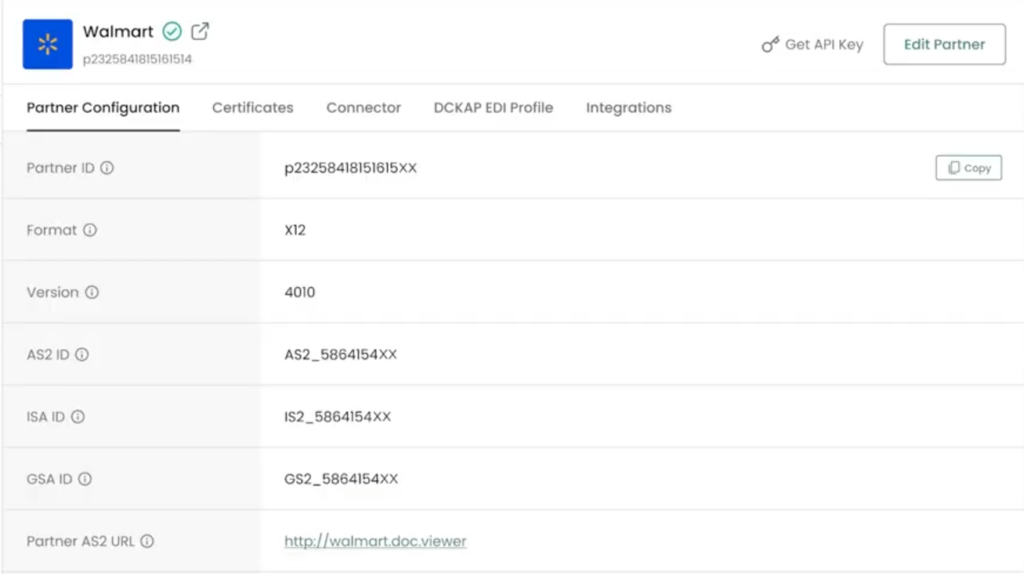
Partner configuration in DCKAP EDI
Connecting and mapping your EDI data will also involve configuring your business partners’ EDI details. Enter your partners’ EDI standard or format, as well as standard-specific IDs.
💡 Best Practice: Use this opportunity to onboard your partners to your EDI system. Create a comprehensive document of your own EDI specifications and standards to send to your partners. You can also establish an EDI-specific contact line, such as an email address, phone number, or form for faster communication.
5. Create Automations
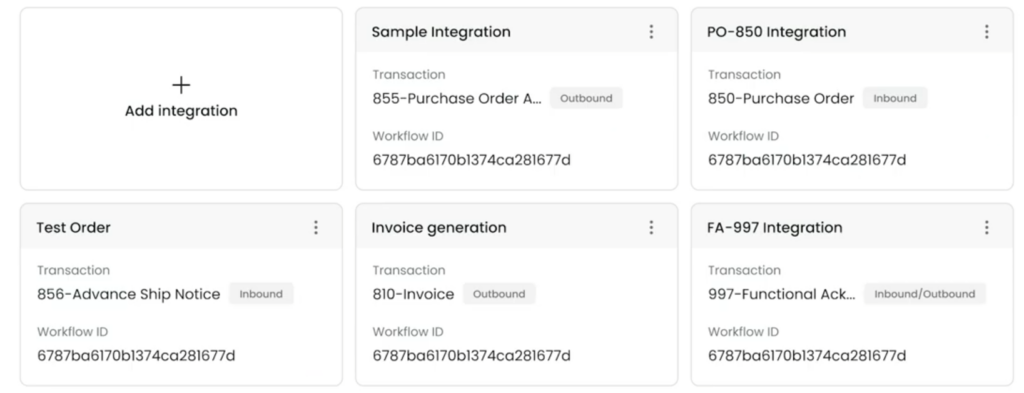
Integrations in DCKAP EDI
Now that your apps, documents, and partners are all in one place, you can build workflows to automate your EDI processes. In DCKAP EDI in particular, you can link specific documents to actions and data fields to create fully automated systems. DCKAP EDI has two types of integrations based on how the data flows:
- Inbound: Documents that come from partners that flow into your ERP or an adjacent application. For example, an incoming purchase order can update relevant transaction data in your ERP.
- Outbound: Documents that automatically send to your partners based on updates to your ERP records. You can have your EDI system send a corresponding invoice when you create one in your ERP, for instance.
💡 Best Practice: Look for ways to automate your EDI partnerships outside of your tool’s main connectors. For example, DCKAP EDI enables you to create API keys for individual partners so you can use them in an integration tool like DCKAP Integrator. With the API key, you can then connect additional apps outside of your ERP-native EDI integrations.
6. Test EDI Transactions and Workflows
Before you go live with your configurations, test your transactions and automations. Work with your most trusted partners to perform tests using these steps:
- Send and receive test documents. Then, check for errors in the sending process and in the data.
- Simulate the entire EDI communication process you plan to use. For example, you could test all of the documents and automations involved in receiving and shipping an order to a partner. The closer the process to your actual EDI transactions, the better.
- Stay in constant communication with your test partner and ask for feedback on their experience with the process. Some errors may happen with outbound documents but not inbound, making it important to have an outside perspective.
Your EDI logs will be an important source of information during this step. An EDI provider like DCKAP EDI will list the status of each EDI transaction and automation with details relevant to troubleshooting.
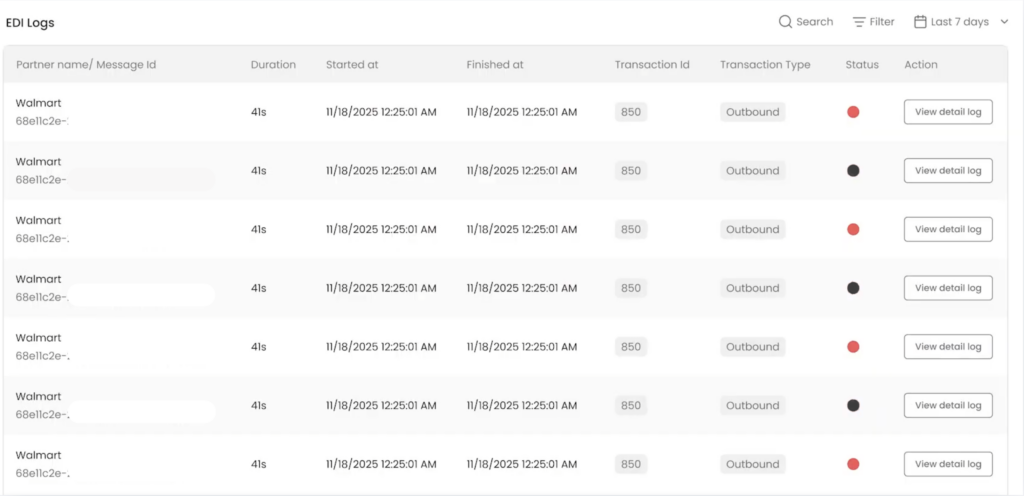
EDI Logs in DCKAP EDI
You can also reference your EDI solution’s list of past transactions for further details. These messages will include raw messages and attachments so you can see what your partners receive. DCKAP EDI’s inbox sorts these messages by sent, failed, and queued.

Messages in DCKAP EDI
Just as you did during the data cleaning step, take the time you need to make sure all transactions and automations run error-free. The purpose of your sandbox environment is to catch potential errors before they happen in a live environment.
💡 Best Practice: Use the same EDI format and data during testing as you will for your live environment. Discrepancies between your test data and live data can lead to errors in live documents sent to your partners.
7. Move Integration to a Live Environment and Monitor Transactions
Once you feel confident in your EDI transactions and integrations, you can transfer your data to a live environment. This process can involve using the live, final version of your software or expanding your transactions to all partners.
From here, maintaining your ERP-native EDI system is an ongoing job. Monitor your error log and transaction history for failed transactions. Since EDI data exchanges are a collaborative effort, look out for inquires from business partners related to errors and data updates.
Make it a regular habit to audit your EDI system. In addition to fixing errors, review your current EDI and automation setup. You may find workflows to remove or change, as well as partner data to update.
💡 Best Practice: Customize your EDI solution’s error notifications to make monitoring automatic. Create regular tasks in your schedule to audit your system and use notifications to urgently catch errors in between.
Consider DCKAP EDI: ERP-First Integration & EDI Management
EDI has long been the backbone of modern supply chain communication, enabling businesses to exchange critical documents with speed, accuracy, and consistency.
DCKAP EDI takes this foundation further by offering a flexible, scalable solution that seamlessly integrates with your existing ERP and eCommerce systems. Whether you’re a distributor looking to streamline order processing or a manufacturer managing complex trading partner relationships, DCKAP EDI simplifies the entire process, reducing manual errors and operational costs.
As digital commerce continues to evolve, having the right EDI partner matters. DCKAP gives businesses the tools and support to stay connected, compliant, and competitive. Talk to our team of integration experts today to see how DCKAP can help your business.