SFTP and API integrations often solve the same problem but in completely different ways.
Both are widely used across enterprises. But the way they operate and the kind of business agility they enable are fundamentally different.
Before choosing one, it’s important to understand what each approach is actually built for.
SFTP vs API Integration: Key Differences At a Glance
| Aspect | SFTP | API |
| Mode | Batch-based | Real-time / event-driven |
| Protocol | File transfer (SFTP) | Web-based (HTTP/REST/SOAP) |
| Trigger | Scheduled (eg. daily, hourly) | On demand (real-time call) |
| Setup | Simpler, good for bulk load | More complex, but flexible |
| Error Handling | Basic (fail or success) | Detailed (response code, retry logic, etc.) |
| Security | SSH, key pair, optional PGP | OAuth, API key, TLS |
| Data Timeliness | Delayed, data arrives on schedule (eg. daily) | Immediate, fetched or pushed in real-time. |
| Data Freshness | Stale by default, only fresh at run time | Fresh, latest on call |
| Change Tolerance | Tolerant to file format tweaks | Sensitive to schema changes |
| Best for | Legacy, bulk files | Modern, dynamic systems |
| Coupling | Loosely coupled via files | Tightly coupled via contract (schema) |
SFTP vs API Integration: Understanding the Fundamental Architectural Differences
Both SFTP and API integrations help systems exchange data. That’s why they often appear in the same integration discussions.
One is designed around moving files between systems. The other is designed around allowing systems to communicate directly in real time. Let’s understand them in detail:
How SFTP Integration Works
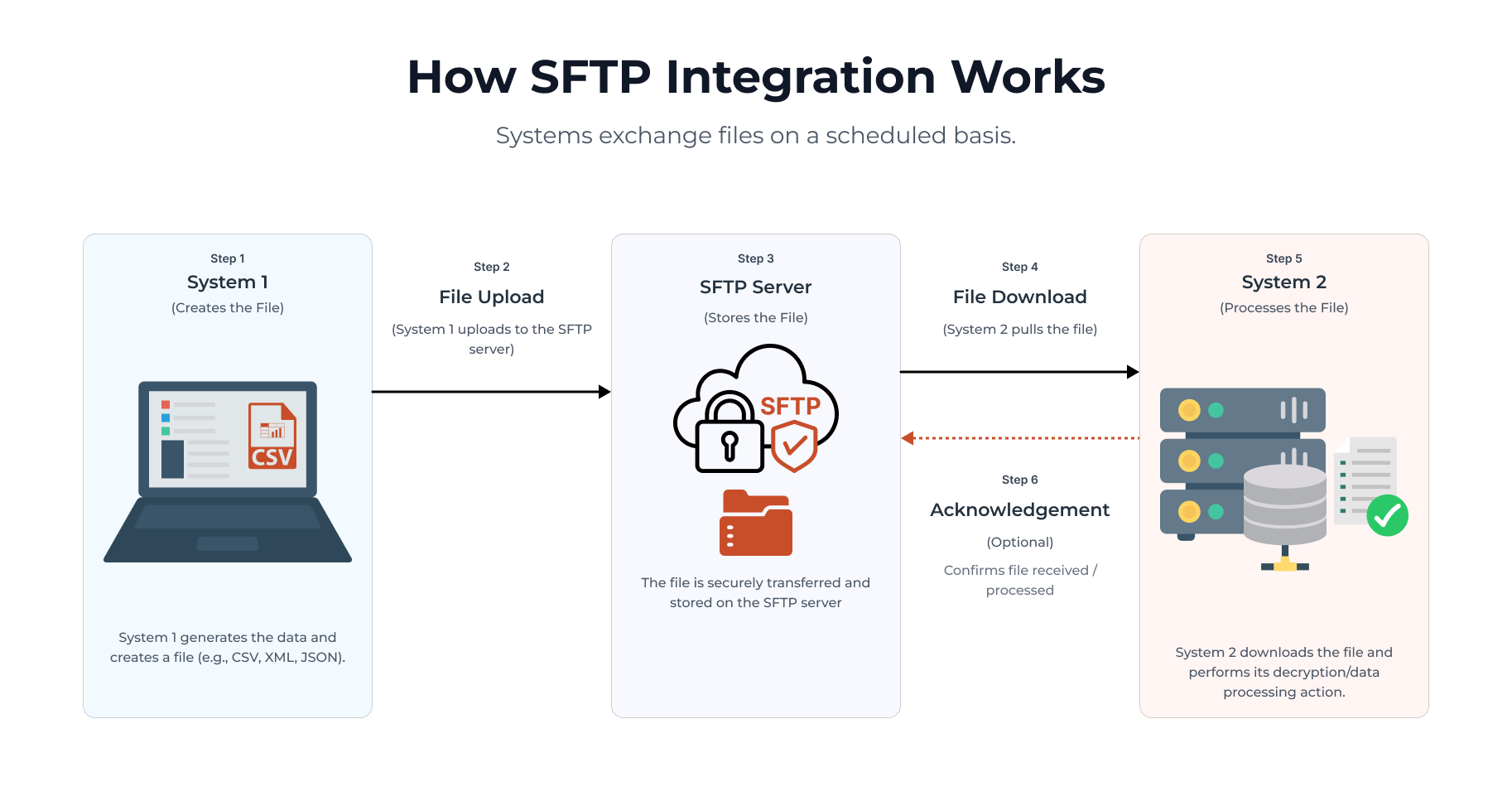
SFTP (Secure File Transfer Protocol) follows a batch-based integration model. Instead of systems talking directly to each other, one system creates a file containing data and places it on a secure server. The other system later picks up that file and processes it. The communication happens in stages rather than instantly.
For example: Imagine an eCommerce platform sending daily order data to an ERP system.
Here’s what typically happens:
- The eCommerce platform collects all orders placed during the day
- It generates a file (CSV, XML, or JSON)
- That file is uploaded to an SFTP server
- The ERP system checks the server at scheduled intervals
- It downloads the file and processes the orders
In this setup, the systems are not constantly connected, data moves on schedules, and updates happen in batches. SFTP integrations are usually built around scheduled jobs, file creation, file uploads/downloads, and batch processing workflows. The architecture is intentionally simple and loosely connected.
Key Features of SFTP integrations:
- Data is exchanged through files
- Transfers happen on schedules
- Systems operate independently
- Processing is asynchronous
- Large volumes of data can be transferred together
Pros:
- Reliable for large-volume data transfers
- Works well with legacy enterprise systems
- Easier to implement for scheduled workflows
- Less dependent on constant system availability
- Good for structured and repetitive processes
Limitations:
- Data synchronization is delayed
- Limited real-time visibility
- Manual operational management can increase over time
- Error detection is often slower
- Not ideal for live customer-facing experiences
Best Fit: SFTP works best when data moves in bulk, timing is predictable, and real-time communication is unnecessary.
Common use cases:
- ERP reconciliation
- Vendor catalog imports
- Financial reporting
- Payroll processing
- Historical data exports
This approach has been widely used in enterprises for years because many legacy systems were originally built around file-based communication.
How API Integration Works
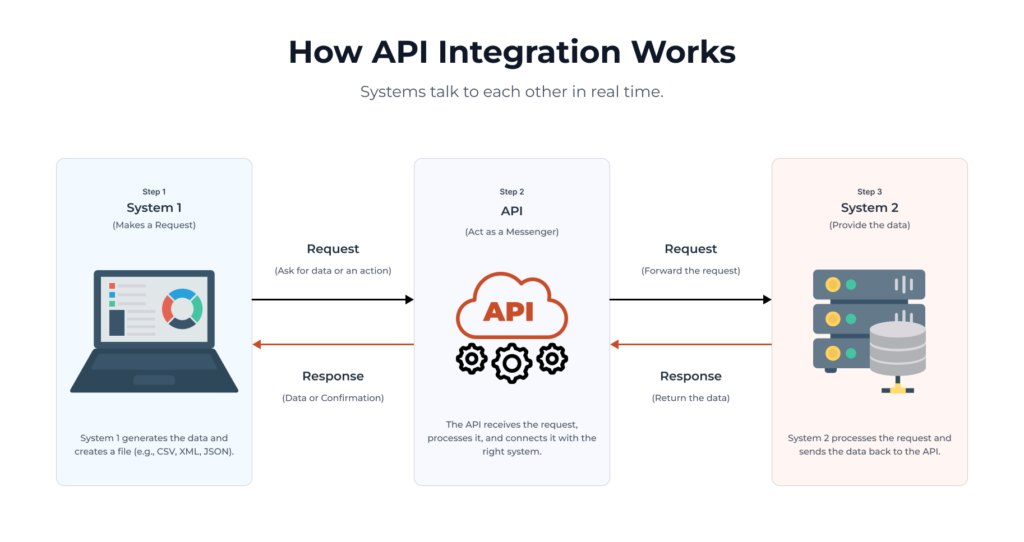
API (Application Programming Interfaces) integrations follow a very different model. Instead of exchanging files, systems communicate directly with each other through requests and responses. One system asks for information or triggers an action, and the other system responds almost immediately.
For example, Imagine the same eCommerce platform checking inventory availability from a warehouse system.
Here’s how API integration works:
- A customer adds a product to the cart
- The eCommerce platform sends an API request to the warehouse system
- The warehouse system checks live inventory
- It immediately sends back the available stock quantity
- The customer sees real-time availability instantly
In this case systems communicate continuously, responses happen in seconds, and data stays synchronized in real time. API integrations are built around direct communication, real-time requests, event-driven workflows, and continuous synchronization between systems. Rather than waiting for scheduled file exchanges, systems interact whenever data is needed.
Key features of API integrations:
- Real-time communication
- Instant request-response model
- Continuous synchronization
- Better system visibility
- Easier automation across platforms
Pros:
- Real-time data synchronization
- Better support for modern digital experiences
- Faster automation between systems
- Stronger monitoring and visibility
- More scalable for cloud-native ecosystems
Limitations:
- Higher implementation complexity
- Greater dependency between systems
- Requires stronger security governance
- Ongoing API management is necessary
- Scaling requires active monitoring and optimization
Best Fit: APIs work best when systems need continuous communication, customer experience depends on live data, and automation is a priority.
Common use cases:
- Real-time inventory checks
- Order management
- Payment processing
- Shipment tracking
- Mobile apps
- Omnichannel commerce
This architecture is especially important in modern digital ecosystems where customer experiences depend on live data.
Also read: EDI vs APIs in B2B Supply Chain Integrations
How to Choose the Right Integration Method for Your Business
Choosing between SFTP and API integration is less about choosing the better technology and more about understanding the specific needs of your business.
Here are the key factors to consider before making that decision.
1. How Quickly Does Your Data Need to Move?
This is usually the biggest deciding factor. If your systems only need to exchange data a few times a day, SFTP can work very well. For example, nightly financial reports, supplier catalog uploads, or daily ERP reconciliation processes typically don’t require instant communication.
APIs become more valuable when the business depends on live system updates. Real-time inventory checks, payment processing, order tracking, and customer-facing experiences often require systems to respond immediately. The more time-sensitive the workflow becomes, the stronger the case for API-based integration.
2. What Type of Business Processes Are You Supporting?
Not every business operates in real time. Some operational environments naturally work in batches. Manufacturing systems, financial reporting workflows, and legacy ERP processes often process large volumes of data at scheduled intervals. In these cases, SFTP integrations are still practical and reliable.
On the other hand, customer-centric digital platforms usually depend on continuous synchronization. eCommerce platforms, mobile apps, marketplaces, and omnichannel systems often require APIs because customer actions trigger immediate responses between systems. The data integration approach should match the operational rhythm of the business itself.
3. What Systems Are You Integrating?
Sometimes the systems themselves influence the decision. Many older enterprise systems were originally designed around file-based communication. They may support scheduled imports and exports more naturally than modern APIs. In these environments, SFTP is often easier to implement and maintain.
Modern SaaS and cloud-native platforms are typically API-first. CRMs, payment gateways, shipping systems, and modern commerce platforms are built to exchange information continuously through APIs. Understanding the technical maturity of your systems is an important part of integration planning.
4. How Important Is Real-Time Customer Experience?
Integration decisions directly affect customer experience more than many businesses realize. For example, if inventory updates only happen every few hours through SFTP, customers may temporarily see outdated stock availability. This can lead to overselling or operational corrections later.
With APIs, inventory can be checked instantly during checkout, giving customers more accurate information in real time. The same applies to shipment tracking, pricing updates, promotions, and order confirmations. The more customer-facing the workflow becomes, the more valuable real-time integration typically becomes.
5. What Are Your Scalability Goals?
Your integration architecture should support future growth, not just current operations. SFTP works well for predictable, scheduled data transfers. But as businesses scale, managing larger files, multiple schedules, and growing integration dependencies can become operationally complex.
APIs are generally better suited for scalable digital ecosystems because they support continuous communication across distributed systems. They also fit naturally into cloud-native and microservices architectures. However, API scalability introduces its own challenges, including rate limits, monitoring, authentication management, and traffic handling. Scalability should be evaluated from both a technical and operational perspective.
6. What Level of Security and Compliance Do You Need?
Both SFTP and APIs can be highly secure when implemented correctly, but they approach security differently. SFTP focuses on secure file transfer through encrypted channels. This works well for controlled enterprise workflows and bulk data movement between trusted systems.
APIs provide more dynamic security controls such as token-based authentication, granular permissions, and real-time monitoring. They also allow businesses to manage access more precisely across systems and users. The right choice often depends on how sensitive the data is, how frequently systems communicate, and how much visibility and control the organization requires.
7. How Much Maintenance Complexity Can Your Team Handle?
Integration projects require ongoing operational support. SFTP environments often involve managing scheduled jobs, file naming structures, retries, storage cleanup, and error handling workflows.
API ecosystems usually provide better visibility and faster troubleshooting through logs and monitoring tools. But they also require active management of authentication, versioning, uptime, and service dependencies. The operational maturity of your internal team plays a major role in determining which approach is easier to maintain long term.
8. Are You Building for Present Needs or Future Architecture?
This is where many businesses shift toward APIs. Even if current workflows can function with scheduled file transfers, future digital initiatives may require real-time data exchange, automation, composable commerce, event-driven workflows, or AI-powered decision-making. APIs provide a stronger foundation for these types of modern architectures.
That said, SFTP still remains a highly preferred choice for many enterprise workflows, especially in legacy ecosystems and bulk-processing environments. The decision should align not only with today’s operational needs, but also with where the business is heading.
9. Remember: Hybrid Integration Models Are Extremely Common
Most enterprises do not rely entirely on just one integration method. A very common approach is APIs for real-time operational workflows and SFTP for bulk transfers and reconciliation processes. For example: live inventory updates may use APIs, while nightly financial reconciliation still runs through SFTP.
This hybrid approach allows businesses to modernize gradually without completely replacing stable legacy processes.
One Platform for SFTP and API Integrations: DCKAP Integrator
As discussed earlier, most businesses eventually end up using a mix of integration approaches. Some workflows require real-time API communication, while others still depend on scheduled SFTP-based file exchanges. Managing both efficiently across multiple systems can quickly become operationally complex. That’s where platforms like DCKAP Integrator become valuable.
Instead of forcing businesses to choose one integration model over another, DCKAP Integrator supports both SFTP and API integrations within a single ecosystem, making it easier to connect ERPs, eCommerce platforms, marketplaces, CRMs, warehouses, payment systems, and other business applications seamlessly. Here are the key features of this tool:
- ERP-first integration architecture
- Supports both SFTP and API integrations
- Connects ERP, eCommerce, CRM, WMS, and marketplaces
- Real-time and scheduled data synchronization
- Centralized data flow across systems
- Managed integration support by the DCKAP team
- Reduces manual data handling and operational effort
- Works with both legacy and modern systems
- Scalable integration infrastructure
- Faster onboarding for new systems and platforms
- Improved operational visibility across the tech stack
- Flexible support for evolving business workflows
So, if you are not sure whether SFTP, APIs, or a combination of both is right for your business, connect with us. We’ll help you determine the best choice for your business.
FAQs
What is the real difference between SFTP and API integration?
The real difference lies in how systems exchange data. SFTP transfers flat files or data files between systems at scheduled intervals, while APIs enable direct API calls for real-time communication between software applications.
Is SFTP the same as FTP?
No. FTP and SFTP are different. FTP transfers files without strong encryption, while SFTP uses secure methods based on SSH protocols to support secure data transfer and better protection for sensitive data.
Which integration method is better for handling sensitive data?
Both can securely handle sensitive data when implemented correctly.SFTP focuses on secure data transfer through encrypted file exchanges, while APIs use robust security measures like access control, token authentication, verification, and encrypted communication protocols.
What should businesses consider before choosing an integration method?
Businesses should evaluate speed requirements, flexibility, system compatibility, security requirements, maintenance complexity, technical expertise, and long-term scalability goals. The best integration strategy depends on the specific instructions and operational needs of the business.
Why do businesses use integration platforms instead of building integrations internally?
Building and maintaining integrations often requires a dedicated engineering team and ongoing management of multiple software components. A centralized integration platform can simplify secure data transfer, monitoring, access control, scalability, and synchronization across software applications. This makes integration management significantly easier for growing businesses.