Inventory sync is the real-time or near-real-time process of communicating current stock availability from the system that physically manages inventory, typically the ERP or a connected WMS, to all other systems that need to display, commit, or plan against it. The data that must stay current includes:
- On-hand quantities by warehouse location
- Available-to-sell figures (on-hand minus allocated and reserved stock)
- Inbound inventory from confirmed purchase orders
- Items in quality hold or quarantine status
Inventory sync is arguably the most time-sensitive of all ERP integration categories. Every pick, receipt, return, adjustment, and transfer changes the picture, often across multiple systems simultaneously.
How Inventory Data Needs To Flow
ERP to B2B eCommerce
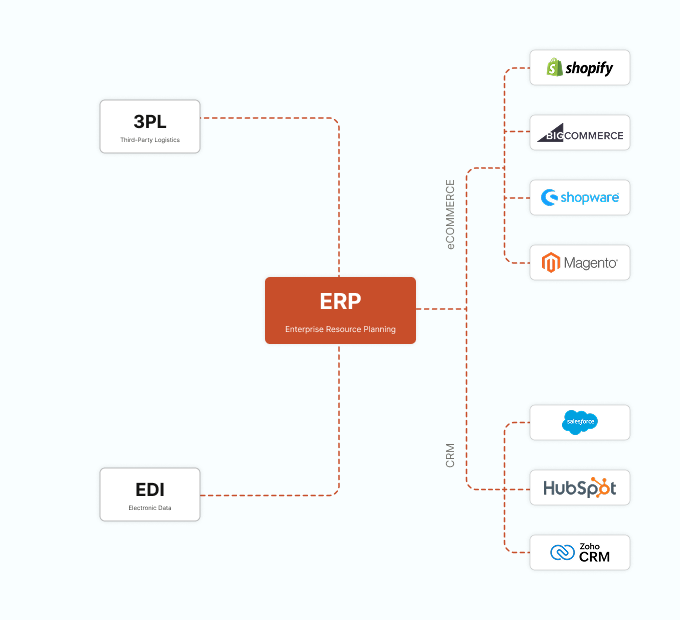
The ecommerce platform needs inventory levels to determine what to display as “in stock,” “low stock,” or “out of stock,” and to prevent customers from ordering quantities that exceed available supply. For B2B distributors with committed contract customers, this also involves available-to-promise logic: not just what is in the warehouse, but what is available after reserved quantities are subtracted.
ERP to 3PL and WMS (ShipBob, 3PL Central, HighJump, Deposco)
When a manufacturer or distributor uses a third-party warehouse, inventory lives in the 3PL’s system. The ERP needs to know what is on hand at the 3PL; the 3PL needs to know what orders the ERP has committed so it can pick, pack, and ship them. This bidirectional inventory sync is critical for maintaining a single accurate view of on-hand stock.
ERP to EDI and Trading Partner Systems
Large retail buyers increasingly require vendors to provide advance availability information and to commit to available-to-promise dates in their purchase order acknowledgments (EDI 855). This requires the ERP’s inventory and open purchase order data to be accessible in real time by the EDI processing layer.
ERP to CRM and Quoting Tools
Sales reps building quotes need to know whether stock is available at the time of quoting. An integration that surfaces on-hand quantities and expected replenishment dates directly in the CRM prevents reps from promising availability they cannot deliver.
Steps To Ensure That Your Inventory Data Sync Actually Works
Define sync frequency based on inventory velocity
Not all inventory moves at the same speed. High-velocity items in a busy distribution center may need near-real-time sync, event-driven and triggered on each inventory transaction. Low-velocity or slow-moving items can tolerate a scheduled sync every few hours. Segment your catalog and apply appropriate sync frequencies rather than treating all items identically.
Sync available-to-sell, not just on-hand
On-hand quantity is not the same as what is available to commit to a new order. Available-to-sell should account for current on-hand, minus quantity allocated to open sales orders, minus quantity in quality hold, plus expected inbound from confirmed purchase orders within a defined window. eCommerce platforms and quoting tools should display this figure, not raw on-hand.
Handle multi-location inventory carefully
If you operate multiple warehouse locations, your inventory sync must communicate not just total on-hand but location-specific availability, and it must apply your fulfillment routing logic before displaying a single number to the customer. If a product has 100 units in a warehouse that does not serve a customer’s region, those 100 units may not be relevant to that customer’s order.
Build buffer quantities into ecommerce availability
For high-volume operations where even a real-time sync has a small lag, consider displaying inventory as available only above a defined buffer threshold, for example showing “In Stock” only when available-to-sell exceeds 5 units. This reduces the risk of overselling during peak periods.
Sync inventory receipts from POs, not just sales deductions
Inventory levels rise as well as fall. Ensure your sync captures inbound receipts. When a purchase order is received in the ERP or WMS, that inventory increase should be reflected in downstream systems as quickly as the outbound deductions.
Log every sync transaction for dispute resolution
When a customer claims they ordered a product shown as in-stock, you need to reconstruct what the inventory sync showed at the moment of their order. Maintain a time-stamped log of inventory sync payloads for a rolling 90-day window.
The Cost of Getting It Wrong
The consequences of poor inventory sync fall into two equally bad failure modes. Overselling, displaying stock as available when it is not, leads to backorders, customer disappointment, expedited shipping costs, and the erosion of trust that takes years to rebuild. Underselling, suppressing orders because inventory sync is unreliable and teams do not trust the data, leaves revenue on the table and sends customers to competitors.
For manufacturers with complex multi-site operations, inventory sync also affects production planning. If finished goods inventory at a distribution center is not accurately reflected in the ERP, production planners may overproduce, leading to excess stock and carrying costs, or underproduce, creating stockouts.
How DCKAP Integrator Handles Inventory Sync
DCKAP Integrator eliminates the most damaging inventory sync failure mode: the stale overnight batch update that leaves your ecommerce platform showing inventory that no longer exists by morning. Key capabilities include:
- Event-driven real-time sync: Inventory data flows from Epicor to connected systems in real time, driven by actual transaction events rather than arbitrary time intervals.
- Multi-location pipeline management: Rather than managing separate integrations between your ERP and each warehouse location, 3PL partner, and ecommerce platform, DCKAP Integrator consolidates inventory data movement into a single managed pipeline. Movements at any location update the ERP, and those updates propagate downstream automatically.
- Configurable available-to-sell logic: Available-to-sell calculations, location-specific availability, and buffer quantity rules can all be configured directly within the integration flow. If your business requires that ecommerce show “In Stock” only when available-to-sell at a specific fulfillment center exceeds a threshold, that rule lives in the integration layer, not in a custom development project.
- Self-service error resolution: When an inventory sync fails, whether a record is malformed, a system is temporarily unavailable, or a value falls outside expected bounds, the failure is logged immediately with full context. Your operations team can see exactly which records failed, investigate the cause, and trigger a resync, all without logging a support ticket or waiting for a developer.
Want to see if DCKAP is the right fit for your inventory integration needs? Schedule a chat with an integration expert today to discuss your specific requirements.
FAQs
How do we handle inventory sync across multiple warehouse locations?
The recommended approach is to sync location-specific availability from each warehouse into the ERP as the central record, and then push available-to-sell figures downstream from the ERP to ecommerce and other systems. DCKAP Integrator supports multi-location inventory flows and can apply fulfillment routing logic to determine which location’s availability is relevant for a given customer or order, ensuring that the number displayed on your ecommerce site reflects what can actually be shipped to that customer, not just total company-wide on-hand.
What is the difference between syncing on-hand quantity versus available-to-sell quantity, and which should we display to ecommerce customers?
On-hand is the raw physical count in the warehouse. Available-to-sell nets out quantities already committed to open sales orders, reserved for specific customers, or held in quality inspection. eCommerce customers should always see available-to-sell, not on-hand, because showing on-hand allows customers to order quantities that are already spoken for, leading to backorders and the customer service fallout that follows. DCKAP Integrator can be configured to sync the available-to-sell figure specifically, rather than raw on-hand.
How quickly does DCKAP Integrator sync inventory changes from our ERP to our ecommerce platform?
Sync speed is configurable based on your requirements and system setup. For high-velocity operations, DCKAP Integrator supports near-real-time event-driven sync that pushes inventory changes within seconds or minutes of a transaction being recorded in Epicor. For lower-velocity operations, scheduled syncs at defined intervals are available. The platform has no hard limits on sync frequency, so the configuration can match your actual operational pace.
What happens if our inventory sync fails or falls behind? How will we know?
DCKAP Integrator surfaces sync failures immediately through its dashboard and alerting system. When a sync job fails or a record errors out, the platform logs the failure with the specific reason and triggers an alert to the designated team members. This allows your operations team to identify and resolve issues before customers encounter the downstream effects of stale inventory data. The platform also maintains a full transaction log, so you can audit what was synced, when, and in what state.
Can DCKAP Integrator handle inventory sync to a 3PL that uses its own warehouse management system?
Yes. DCKAP Integrator connects to any system that exposes an API, which covers the vast majority of modern 3PL and WMS platforms. The integration handles both directions: outbound orders flowing from Epicor to the 3PL for fulfillment, and inbound inventory updates flowing from the 3PL back to Epicor when shipments go out or new stock is received. This bidirectional flow ensures that your ERP remains the system of record for inventory even when physical stock is managed by a third party.