There is a treasure-trove of information locked within ERP and ecommerce platforms which, when synced, can unlock and host of new opportunities for businesses. If your online store doesn’t talk to your ERP, CRM, and inventory systems, someone on your team is stuck re-typing data between them. That’s what eCommerce integration fixes. This guide covers what it is, the main methods, best practices, common questions, and why it matters most for distributors and manufacturers specifically.
What is ERP eCommerce Integration?
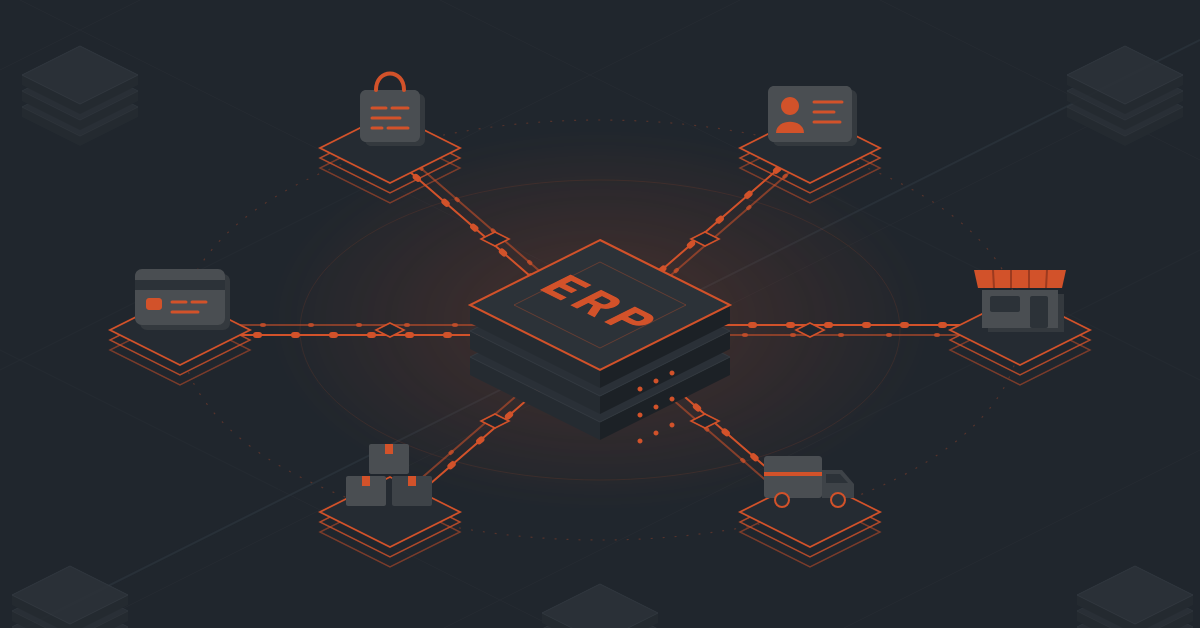
eCommerce integration connects your online storefront to the back-end systems that actually run your business: ERP, inventory, CRM, shipping, accounting, PIM, and EDI. Once connected, data like orders, pricing, and stock levels flows automatically between systems instead of being entered by hand in five different places.
For distributors and manufacturers, this isn’t a nice-to-have. Catalogs run into tens of thousands of SKUs, pricing varies by customer contract, and orders need to hit the ERP the moment they’re placed. Manual entry doesn’t scale to that.
ERP – eCommerce Integration: Steps Involved
1. Data sources
First, you need to understand the type of data sources you’ll use. This matters because it can help you decide what type of integration will work best.
Cloud-based: Most of today’s ERP and eCommerce platforms are based in the cloud and use a software-as-a-service (SaaS) integration model. These are easiest to integrate since they have universal connectors that can be integrated into other modern platforms.
On-premise: This is a back-office ERP platform that’s run off local hardware. While you can integrate with this type of system, it tends to be legacy software that presents new challenges.
Hybrid: Some businesses use a combination of tools, like a cloud-based eCommerce site and an on-premise ERP platform.
Recommended Read: On Premise vs Cloud: Tools, ERPs and Integration Decoded
2. Methods for ERP – eCommerce Integration
You can set up an ERP integration using one of three different methods.
Point-to-point integration
Two systems are connected directly through custom code.
- Pros: full control over logic, no middleware cost, works fine for one connection
- Cons: doesn’t scale, each new system is its own project, becomes a tangle of custom code to maintain
- Best for: businesses with exactly one or two systems to connect and no plans to add more
Middleware / Integration Platform
A middle layer sits between all your systems and manages the data flow centrally. It’s the model behind platforms like DCKAP Integrator, which routes everything through one hub instead of a web of one-off connections.
- Pros: scales easily as you add systems, one place to monitor and manage everything, less custom code overall
- Cons: adds a platform to learn, ongoing subscription cost
- Best for: distributors and manufacturers running multiple systems (ERP, CRM, eCommerce, marketplaces) that need to stay in sync long-term
API-based integration
Systems exchange data directly through APIs in real time.
- Pros: fast, real-time, reliable when APIs are well-documented
- Cons: depends entirely on both systems having stable, modern APIs, which older ERPs sometimes lack
- Best for: connecting modern, API-friendly platforms where you want direct, low-latency data flow
Pre-built connectors
Ready-made integrations for common systems (Shopify, BigCommerce, NetSuite, Epicor, Salesforce, and so on) that cut setup time from months to weeks.
- Pros: fastest to deploy, less development cost, tested and proven configurations
- Cons: less flexible for unusual or highly custom workflows without added configuration
- Best for: businesses connecting popular, widely-used systems and wanting to go live quickly rather than building from scratch
3. Types of data to transfer
Before starting with an eCommerce integration you should decide what data to transfer and in which direction it will move. For example, you might only want order information to flow from your web store to your ERP system.
Some of the most common types of data to transfer include:
- Product information
- Customer data
- Pricing
- Shipping
- Inventory levels
- Order/invoice information
- Taxes
- Returns
4. Process for setting up an ERP – eCommerce integration
Here are the steps we recommend for setting up an ERP integration with your ecommerce system:
Now that you know what to look for, let’s examine the steps to successful ERP eCommerce integration.
- Establish clear goals. Both front-end and back-end parties should have a clear understanding of what they hope to achieve from the integration.
- Define the business processes to integrate. Make sure that both ERP and eCommerce systems can handle the necessary tasks.
- Map out the data flows. This will help ensure that data is transferred correctly and efficiently between systems.
- Test thoroughly before going live. Run several tests of the data integration process before moving into a live deployment. This will help ensure that there are no errors and that the systems are working properly together.
- Plan for post-integration support and maintenance. Systems will inevitably go down occasionally, so make sure you have someone who can troubleshoot issues and get the systems up and running again as quickly as possible.
But deciding to integrate your ERP and eCommerce systems is only the first step. You’ll also need to understand common challenges and best practices to overcome these issues.
Recommended read: eCommerce Integration Explained
Challenges with ERP Integration with eCommerce
There are many issues you may face when integrating ERP and eCommerce systems. Some of them are on the human side, others are on the side of your integration software, and still others depend on the software you’re already using.
Here are some of the most common:
Scaling
Before embarking on an integration, ensure your existing eCommerce system and ERP solution can handle the integration’s data flow requirements. Most modern solutions shouldn’t hit any snags, but you want to ensure you don’t discover bottlenecks or slow down business operations midway through.
Budgeting
It’s easy for an integration project to go over budget, but the solution usually lies in planning. To prevent unexpected problems, develop a very clear plan ahead of time, so your integration can happen smoothly.
Custom integrations
Many ERP systems and online stores have bespoke features tailored to business needs. These can make integration more challenging since the usability isn’t the same as the software out-of-the-box. It also means updates and changes aren’t straightforward since there are custom features to support.
Older software
Outdated apps or legacy on-premise solutions can be challenging to integrate. If you’re considering upgrading to a cloud platform, this can make a big difference in how easily and quickly you can get started with your integration.
Multiple data types
The more data types you’ll need to integrate, the more complex the system will be. Look to simplify whenever possible. Making choices now to streamline your data flows will make it even easier to implement a smart integration.
eCommerce – ERP Integration Best practices
These best practices can help you avoid common challenges and ensure your integration process is a smooth one.
Choose the right integration solution
Using cron jobs, writing code, or even worse—manually transferring data between applications—can impact every aspect of your business.
Your eCommerce website and ERP platform are complex systems, so invest the time to choose an integration that works for your unique needs. Look for a tool that integrates with the platforms you rely on and has experience launching these very integrations.
Communicate with all stakeholders
An integration can affect almost everyone in your business, so ensure everyone is up to date with what’s happening. Explain how each sales channel will be impacted and what the integration will mean for the productivity of each department and the business as a whole. Work to get buy-in before moving forward with the live integration.
Choose the appropriate level of security
Look for an integration solution that provides the level of data security you need. A common misconception is that on-premise solutions are more secure. While they frequently provide more control over security settings, the reality is that cloud-based iPaaS applications usually have stricter protocols and follow more robust data compliance measures.
Find a partner that offers support
While most integrations happen seamlessly, even the small probability of an issue along the way matters when it impacts your offline and online business processes. Look for a solution that can auto-troubleshoot issues and has a 24/7 support team to ensure everything runs smoothly.
Streamline Your ERP – eCommerce Integration Using DCKAP Integrator
DCKAP is a high-performing, ERP-first Integration platform built for manufacturers and distributors. Rated at 4.7/5 stars out of over 50 reviews on G2, the tool is known for making tools seamless talk to each other.
Here are some instances of how DCKAP can help you for seamless integration and optimize your ecommerce-ERP integration:
- ERP-first architecture: DCKAP Integrator connects everything (eCommerce, CRM, inventory, accounting, EDI, marketplaces) back to your ERP as the source of truth, which is exactly the setup distribution businesses need to avoid conflicting data.
- Built for the systems distributors actually use: Pre-built connectors for Epicor Prophet 21, NetSuite, SAP, Microsoft Dynamics 365, Acumatica, and major eCommerce platforms like Shopify, BigCommerce, and Adobe Commerce mean less custom development from the start.
- Low-code, dashboard-driven management: Syncs, schedules, and exceptions are managed through a straightforward dashboard, so day-to-day changes don’t require a developer every time.
- Real reliability features, not just a sales pitch: Server health checks, a test-connection tool, configurable token and timeout handling, and detailed logs mean issues get caught early instead of showing up as missing orders.
- Fully managed, not DIY: DCKAP’s team handles setup, custom logic (including Python-based custom rules when needed), and ongoing support, so distributors aren’t left maintaining an integration stack on their own.
- Transparent, predictable pricing: No hidden fees or sprawl of add-ons, which matters when you’re trying to budget an integration project realistically.
Conclusion
The benefits of integrating your ERP and eCommerce solutions are too important to miss. Bringing your eCommerce business to the next level requires data synchronization.
With DCKAP Integrator it’s a simple process to start synchronizing data across these two systems. The integrator has pre-built connections for the major ERP and eCommerce providers and is platform-agnostic to work with other software.
Looking for the right ERP eCommerce integration platform? Get started with DCKAP Integrator.
FAQs
Do I need developers on staff to manage integrations?
Not if you’re on a low-code platform with pre-built templates and a visual dashboard. You’ll still want technical support available for edge cases and custom logic. DCKAP offers the additional benefit of leaving the implementation and customization to its team of experts.
What’s the difference between iPaaS and a direct API integration?
Direct API integration connects two systems only. iPaaS acts as a hub connecting many systems, which matters once you’re managing ERP, CRM, eCommerce, and EDI all at once.
Can integration handle customer-specific pricing?
Yes, and it should. Contract pricing, tiered discounts, and customer-specific catalogs should sync automatically rather than being managed manually at checkout.
How much does eCommerce integration cost?
It depends on the method. Point-to-point custom builds tend to cost more over time due to ongoing maintenance. iPaaS platforms with pre-built connectors usually cost less upfront and scale more predictably as you add systems. DCKAP’s pricing starts at $1,250 per month.
Which integration method should I choose?
For a single, simple connection, direct API or point-to-point can work. For anything involving multiple systems (ERP, CRM, eCommerce, marketplaces), an integration platform is generally the better long-term choice for distributors and manufacturers.
Is EDI still relevant with modern APIs available?
Yes. Many retail and distribution trading partners still require EDI compliance, so it typically runs alongside API-based integrations rather than being replaced by them. DCKAP offers a way for users to connect critical EDI data with the ERP along with its robust EDI management features.
Frequently Asked Questions
What is ERP System?
ERP is an enterprise resource planning system that allows businesses to manage their operations, from accounting to human resources to manufacturing. ERP integrates all of the business’s departments into a single system, allowing for streamlined data sharing and improved efficiency. eCommerce is the process of buying and selling goods and services over the internet.
What are the different types of ERP Integration?
CRM Integration: CRM integration involves integrating your ERP with a customer relationship management (CRM) system. This enables you to use the CRM features such as marketing automation, salesforce automation and reporting capabilities in your ERP. It also allows you to share data across multiple systems and applications such as SAP, Oracle and Microsoft Dynamics GP etc.
eCommerce Integration: eCommerce integration is when you integrate your ERP with an e-commerce platform like Shopify or Magento etc. This enables you to track orders, inventory and customers across multiple platforms.
Business Intelligence: Business Intelligence (BI) is an integrated analytical platform that integrates all the functionalities of an organization’s business systems into one single application called BI infrastructure. It captures data from various sources such as ERP, CRM etc., analyzes it and displays results in real time to make informed decisions based on accurate information.
Electronic Data Interchange: EDI stands for Electronic Data Interchange which is an electronic messaging protocol used for exchanging business-to-business messages between suppliers and buyers. With the help of EDI integration, companies can exchange their orders with each other quickly and efficiently.
EAM Integration: Enterprise application management (EAM) is an approach to managing all IT applications within an organization — from laptops to servers to networking equipment — from a single interface. EAM enables IT teams to provide unified management across all devices and applications within the enterprise so that IT personnel can focus on other works by automating manual work.
Recommended Reading: A Complete Guide to ERP Integration: Types, Benefits and Challenges
What is ERP eCommerce Integration?
ERP eCommerce can be integrated to provide a more seamless experience for the customer. By integrating these systems, businesses can improve their order processing, inventory management, and customer service. Moreover, linking your ERP system with an eCommerce platform provides an easy and integrated way for your customers to buy anything online.
The integration enables you to improve efficiency through data collection and analysis. Also, it reduces costs by eliminating manual processes that were previously required for each transaction. This means that every time a customer makes a purchase from your store, it will be automatically recorded in your ERP system without any additional work on your part!
How Can You Overcome the Challenges of ERP eCommerce Integration?
Making the decision to integrate your ERP and eCommerce systems is only the first step. The next step is overcoming the challenges of ERP eCommerce integration.
This can be difficult, but it’s not impossible. Here are five tips for overcoming the challenges of ERP eCommerce integration:
- Establish clear goals and objectives.
- Communicate with all stakeholders.
- Plan and test extensively.
- Manage expectations.
- Stay flexible
- Above all, choose an integration strategy that is compatible with your eCommerce & ERP system
What is the Difference Between Hosted ERP and Cloud ERP?
The Cloud ERP is a new way of looking at business processes, and it is a game changer. It allows organizations to take advantage of all the benefits of the cloud without having to spend on expensive hardware or software licenses.
With Cloud ERP, businesses can use software as a service (SaaS) technologies such as CRM, customer relationship management (CRM), accounting, project management and more. This approach has many advantages over traditional systems.
On the other hand, hosted ERP systems are typically installed on-premises and require IT resources to manage them. They can be expensive to implement, manage, and maintain.
Relevant Reading: Top 10 Modern ERP Solutions for Manufacturers & Distributors
What Are the Steps to Successful ERP eCommerce Integration?
Now that you know what to look for, let’s take a closer look at the steps to successful ERP eCommerce integration.
- Establish clear goals and objectives for the integration. Both parties should have a clear understanding of what they hope to achieve from the integration.
- Define the business processes that will be affected by the integration. Make sure that both ERP and eCommerce systems can handle the necessary tasks.
- Map out the data flow between systems. This will help ensure that data is transferred correctly and efficiently between systems.
- Test the integration process thoroughly before going live. This will help ensure that there are no errors and that the systems are working properly together.
5. Plan for post-integration support and maintenance. Systems will inevitably go down occasionally, so make sure you have someone who can troubleshoot issues and get the systems up and running again as quickly as possible.
How Do You Choose the Right ERP & eCommerce Solution for Your Business?
When you’re looking for an ERP & eCommerce solution, it’s important to consider your business’ specific needs. Here are 10 questions to ask yourself before you make a decision:
- What are your business’ goals?
- What is your budget?
- What are the features of the different solutions?
- What is your timeline for implementation?
- How will the solution integrate with your existing systems?
- How will the solution scale as your business grows?
- How will the solution handle order management and fulfillment?
- How will the solution handle payments and refunds?
- What customer service and support options are available?
- How do you choose the right ERP & eCommerce solution for your business?
How to Choose the Right ERP eCommerce Integration Partner?
Choosing the right ERP integration vendor is a crucial task that defines your integration success. It’s not only important to choose someone who can get the job done fast and efficiently, but also someone who offers a range of services that will meet your needs and expectations.
Here is your checklist you need to prepare before finalizing an ERP eCommerce Integration vendor:
- Define Your Business Needs
- Research Different Vendors
- Evaluate the Features Each Vendor Offers
- Consider Ease of Use
- Determine Compatibility
- Look for Customer Support
- Consider Pricing
- Ask for References
Yes, there are a lot of factors that you need to consider while choosing a vendor to streamline integration. Sounds a little knotty, but not anymore with the ERP integration guide in your hand.